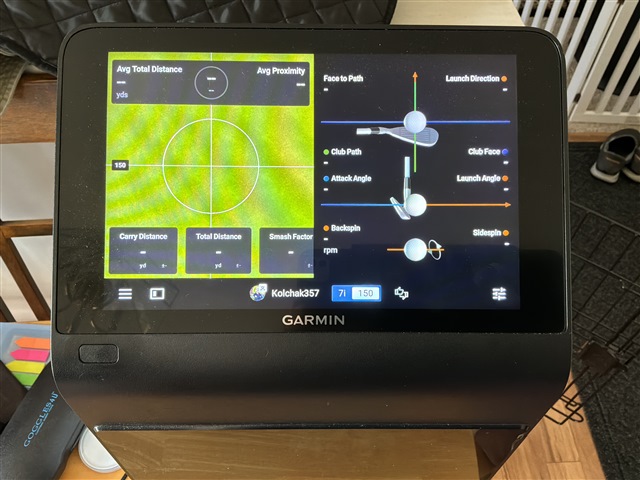
Has anyone got the range targets to work? I have selected the designated distance on the new update which i am wanting to play to and was expecting a distance circle a set distance down the range but doesn't seem to display anything.
Perfect got it, just hadn’t gone into view settings thanks bud.
Thanks for this. When Garmin makes these updates, is there a place to go to see how to actually use them? Like an instruction manual or new updates feature with instructions? Also, is there a setting where…
I’m disappointed with the result. I just wanted a green on the range itself. A green that I could set to any distance I want (maybe in 5 hard increments). What they did is overly complicated and forces…
The target isn’t visible on the range view itself. It’s visible as an overheard view.
From the driving range….
select R50 display
view settings
distance control
then you can set your target size etc.
If you are just using the R50 without an external display it will look like this. (See pic below) At the bottom you can see I have it set for a 7 iron with a target at 150 yards.

Perfect got it, just hadn’t gone into view settings thanks bud.
Thanks for this. When Garmin makes these updates, is there a place to go to see how to actually use them? Like an instruction manual or new updates feature with instructions? Also, is there a setting where I can be emailed updates to this forum? Maybe I am missing all this, ha!
No not really they put out a email or sometimes like the "bag mapping feature" there is a tutorial to follow, I was kind of expecting this to have the down the line view with a follow ball camera (similar to when youre playing on the course, where the camera follows the ball) but beggars cant be choosers
I’m disappointed with the result. I just wanted a green on the range itself. A green that I could set to any distance I want (maybe in 5 hard increments). What they did is overly complicated and forces me to use another view. This is why Garmin needs to actually talk with their users or maybe have a group of real world beta testers.