
Inaccurate Ball Flights

I have noticed several time where the ball flight does not match the data that is shown in the system. For example see the image:   The characteristics of a in to out path and a closed face to path means this should be a push draw, basically starting out to the right and move left. This typically happens with the driver/3 wood. Thanks for looking into this
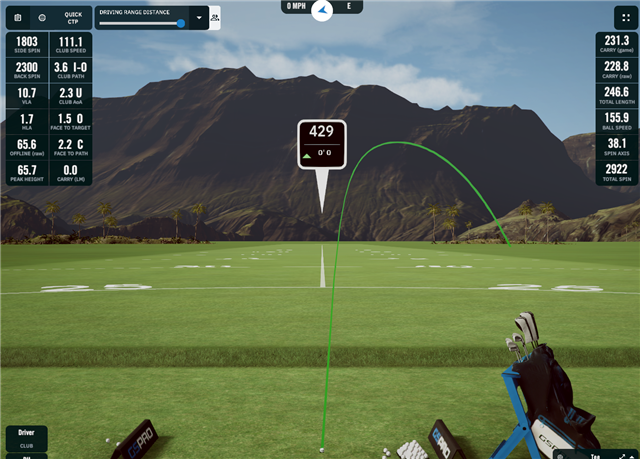
  • I'm seeing this too. I'm really trying to work on my I-O path while keeping that club face closed relatively, but seeing this result is discouraging. Like if there's something else to it, then let me know, otherwise, I-O with a slight closed club face, should be a draw.

  • Get your face to path C number greater than I-O number and post the screen shot.

    from what I have seen and read is the face to path C number has to be greater than I-O number.

    R50 picks up the dimples on the ball and can see the spin as long as the lighting is good. I have taken mine to the range and every ball flight is pretty much spot on. If I hit a draw the face to path is greater than I-O number.

    See how your club face is still showing open? Get that number to 0 with an I-O path and see how it looks on ball flight.

    Smash factor also has an impact on spin depending on where you contact the face. Especially driver!

  • The image is pretty much what I've been taught. focusing on F, green line is the I-O and using the context of this post, that angle would be 3.6 degrees. now the Face to Path (Black in F) is listed as 2.2 C, so its 2.2 degrees closed from the path which would place it 1.4 O from the Target. These data points and the image at hand tell me OP's shot should look like a push draw

    https://imgur.com/RB6hxrW

  • If your ball strike is off center the gear effekt will kick in, especially on driver or woods. The gear can cause a fade easily with an insude out club path and closed face to club path. Read the infovin this link peterfieldgolf.co.uk/.../

  • But that isnt listed as a simulator data field. so why would it be taken into consideration during the calculation? If it is and we're not seeing it, then sure, but given the data, your Gear Effect isnt in play here

  • Well it is correct that impact point on the club face is not measured but he R50 measures the spin axis an rpm from the movement of the dimples on the ball. The gear effect has a big influence on spin axis and rpm when ball strike is off center as such gear effect is detected by the R50, it is included in the spin rpm and spin axis. In your case you will notice a spin axis to the right. Caused by a ball strike on the heel of club face.

  • The smash factor was 1.39 so not in the middle of the face. I think this could have an impact with spin. R50 says it saw 1800 right spin. Hard to tell until you take it outside with newer range balls.

    i want to see a screen shot of 3.6 I-O and face to path over 4.0 C. I know what mine looks like. Either straight or a little draw.

  • Please try the troubleshooting steps in this FAQ we've created to help improve the accuracy of your Approach R50.

  • Your FAQs page are almost worthless - your page on "Adjusting the Target Alignment" does NOTHING to help us understand how to get the dang thing aligned correctly.

    1. During a driving range session, select Menu > Target Alignment. - EZ ENOUGH
    2. If necessary, select Reset to set the target alignment back to 0 degrees.SO, HOW DO WE KNOW IF IT IS "NECESSARY"??
    3. Place a golf ball within each of the two areas pictured on the launch monitor's display. EZ ENOUGH
     4. Move the golf balls to adjust your target alignment.SO, JUST MOVE THE BALLS AROUND UNTIL WHAT?  THEY ARE ALINGED AT 0 DEGREES?  UNTIL THEY POINT AT MY TARGET?  THEN WHAT?  DO I MOVE THE MACHINE TO MAKE SURE THE READING IS 0 DEGREE AND THE BALLS ARE AIMED AT MY TARGET?  OR DOES THE MACHINE AUTOMATICALLY ALIGN ITSELF AS LONG AS MY BALLS ARE AIMED AT THE TARGET??
    5. Select Save. 

  • I would like to see a more in depth plain English explanation of target alignment features for both the range and play. A video explanation of the choices especially the offset, and consequences of those choices, could be very helpful.