Incorrect ball impact spin display

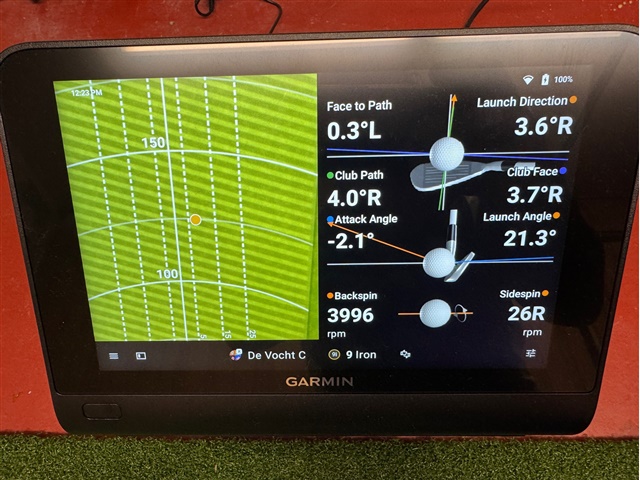
Any one else have this problem? The ball impact always shows side spin as right. See picture below

Actual ball flight is a draw. .. data fields show correct left spin but ball impact always shows sidespin as R.
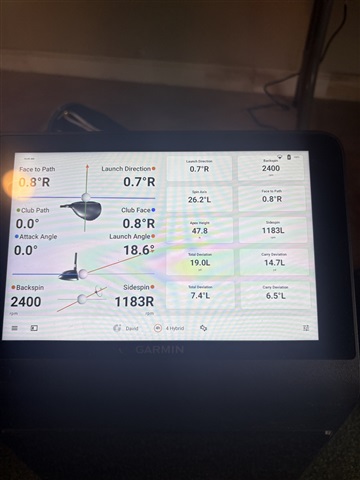
  • Mine is up to date, 4.60, same issue.  It is specifically in the club data fields on the R50.  Look at the picture provided by the original poster, it is correct on the right side of his display (shows 1183L) but incorrect in the club data display on the right side (shows 1183 R).

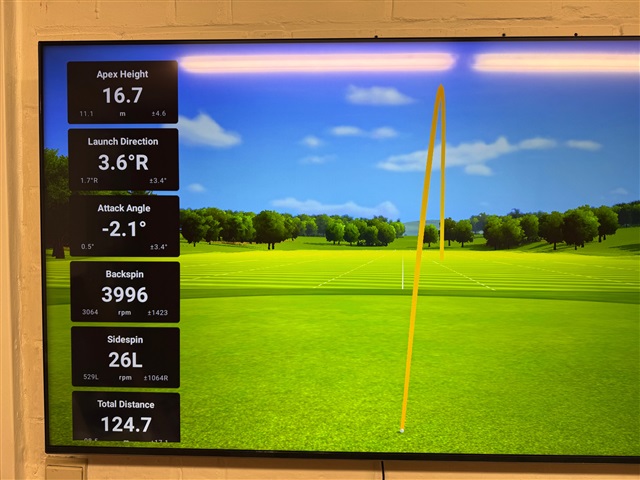
  • Here you can see a forced pulled shot: it is correct on the big screen (sidespin 26L) and wrong on the R50 display (sidespin 26R).

    I want to add, when the sidespin is correct Rxx on the big screen, it is also Rxx on the R50 display. So basically it shows the sidespin on the R50 always as R. On the big screen it is always correct.

    FWW this is data from a left handed and metric system.

  • I sent in a report a month ago . Will this get fixed?z

  • What does R spin means according to Garmin? If the ball spins in R direction(anti clockwise looking down on a ball) it will curve left. If you throw a ball with righ spin on it(anti clockwise) it will curve to the left. R spin is a hook/draw spin for a right handed player or should be to make any sense how a ball flies through the air. I am confused why it shows L spin on the external screen, makes no sense at all.

  • Thats why it is a bug and needs a fix.

    If a ball has left spin, it will tend to bend in the air to the left. right is of course the opposite.

  • Normally a ball curves in the opposite direction of the spin. Think of backspin, ball spins in down direction but goes up. Left spin will curve right. Assuming Garmin displaying how the ball spins in rpm/direction and not directly if it is curving left or right.

  • In golf, R is slice/fade. L is hook/draw for a right handed golfer.

    Moreover, the point of the bug is that the display of club data always shows R, regardless of ball flight.  It never changes.  That it is a bug is easily confirms on both photos where the ball data shows an L at the same time club data shows an R.

    This is such an easy fix I’m surprised Garmin has not acknowledged and responded yet.

  • But how do you mean a ball is spinning. Why should a ball in golf behave different than in any other sport? If you put the club behind the ball without hitting. Just touch the ball and pull the club towards you and put a little sidespin on it. In what direction does the ball spin left or right? If sombody was watching you, they would say that you pull the club left. For me as a righty the ball spins left/clockwise which is same as a slice swinging out-to-in creating left sidespin. I agree about the problem that it displays different or opposite spin on display and on external screen.

    • It just convention.  It’s been the same convention in any simulator I’ve used, this isn’t just Garmin.
    • In most golf simulators and launch monitors, “R” means right-spin, which corresponds to clockwise rotation as viewed from behind the ball (the golfer’s perspective looking toward the target).

      • R (Right spin) → Clockwise → ball curves to the right (fade/slice for a right-handed golfer)
      • L (Left spin) → Counterclockwise → ball curves to the left (draw/hook for a right-handed golfer)

  • Many thanks, that makes sense. I did not know that they thought of displaying spinning a ball in that way. Now at least my head can stop spinning about this Slight smile