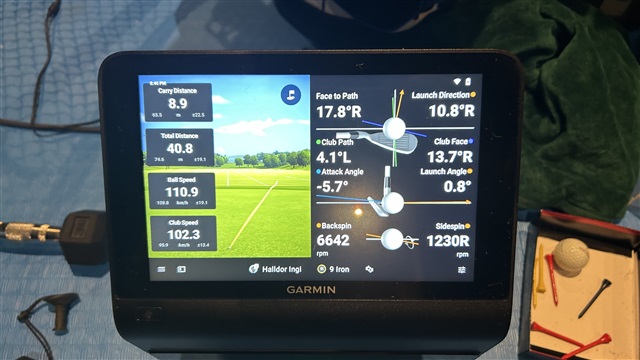
External display does not allow split screen

Hello Garmin Team,

I’m trying to optimize my range practice setup and wanted to confirm if I’m missing something or if this functionality isn’t currently supported.

My goal is to have:

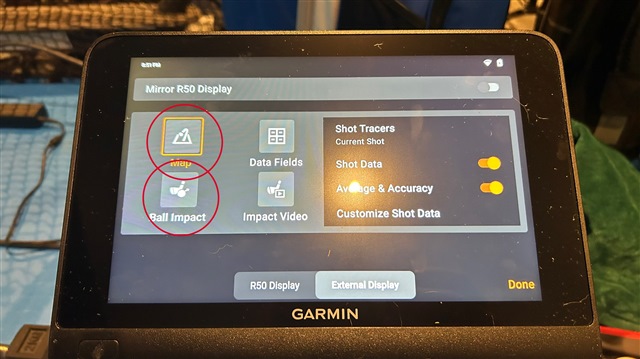
External Display: “Map” and “Ball Impact”

R50 Display: “Impact Video”

Currently, I can only achieve a split screen on the R50 and then mirror that to the external display.

Could you let me know if I’m doing something incorrectly, or if this feature could be considered for a future update—specifically the ability to split the external display independently from the R50?

Thank you for your guidance!

See some photos below

Best regards
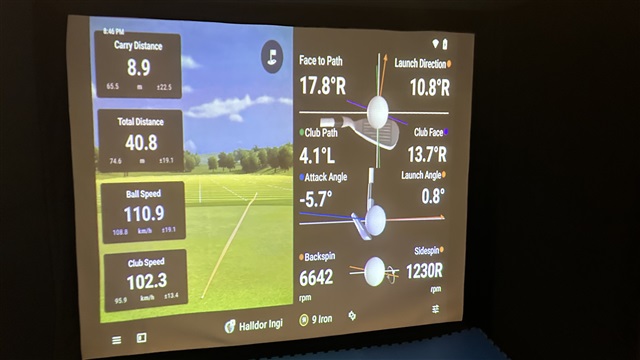
These two above are me mirroring the External to the R50

Below are the data fields i would like to select at the same time for external display or allow us to splitt it like the R50
Top Replies

  • My goal is to have:

    External Display: “Map” and “Ball Impact”

    R50 Display: “Impact Video”

    Currently, I can only achieve a split screen on the R50 and then mirror that to the external…

All Replies

  • My goal is to have:

    External Display: “Map” and “Ball Impact”

    R50 Display: “Impact Video”

    Currently, I can only achieve a split screen on the R50 and then mirror that to the external display.

    Could you let me know if I’m doing something incorrectly, or if this feature could be considered for a future update—specifically the ability to split the external display independently from the R50?

    The split-screen option is only available on the R50 device itself. When you connect the Approach R50 to an external display, the external screen can show only one of the following items at a time:

    • Map: Shows you the virtual course or range and the ball path after each shot.
    • Data Fields: Shows your club metrics.
    • Ball Impact: Shows data points relating to your previous shots ball impact.
    • Impact Video: Shows you a short video of your previous shot, highlighting the impact made with the ball. 
    • Mirror R50 Display: This will mirror the entire display of the Approach onto your projector, TV, or monitor. 

    On the R50 itself, you can choose to split the display and show two different views at the same time (like "Map" and "Ball Impact"). Then you can have the external display show "Impact Video". 

    For additional information on using the Extended Display feature, visit How Do I Use the Extended Display Feature on My Approach R50?

    With regard to the split-screen option being available on the external display, you're welcome to use our Ideas Portal to share that with our team of innovators for future consideration! 

  • Thank you for clarifying this!

    I understand the current limitation now.

    The reason I asked is that my coach prefers seeing all the impact data on the external screen, and having the impact video alongside would have been a great extra parameter for analysis.


    I’ll definitely share this suggestion through the Ideas Portal for future consideration.