Python FIT SDK returns developer fields keyed by ordinal — is this intentional?

Hi Garmin FIT team,

I’m using the Python FIT SDK to decode FIT files with developer fields.

In the decoded output, developer_fields are keyed by a numeric index (0,1,2…), not by (developer_data_index, field_definition_number).

I can see that FIELD_DESCRIPTION messages do include developer_data_index, field_definition_number, and field_name, but the values in developer_fields are returned using an ordinal “key” (index in the field description list), so I have to reconstruct names by matching ordinals.

Questions:

  1. Is the ordinal keying of developer_fields intentional in the Python SDK?
  1. Is there a supported way in the Python SDK to retrieve (developer_data_index, field_definition_number) per developer field value?
  1. Would you consider exposing developer fields keyed by field_definition_number (or include developer_data_index + field_definition_number alongside the values)?

Thanks!

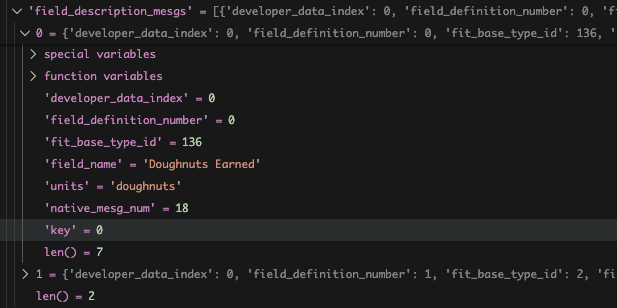
  • For better or worse this is a gap in the documentation. The "key" is added to the corresponding field_description_mesg. Each CIQ data field decides on their own values for the field_definition_number. Most will start at 0 or 1. So it is a combination of the field_definition_number and the developer_id that makes a unique fingerprint. The decoder tracks these unique fingerprints, the key, and uses the key to id the values.

    The decoder returns the lists of developer_data_id and field_description mesgs, so that information is provided. The key that you see in the messages can be used to look up the field_description mesg. The developer_data_index in the field_description can be used to lookup the developer_data_id. 

    There are are a few hops that need to be done, but it keeps the mesgs themselves from being bloated.

    This is an example of a the key in a field_description mesg. The key is not an index, so you will need to search the field_description mesgs for a match. 


    We will add this to the docs by the end of the quarter.

  • Hi Ben,

    Thanks for the explanation!

    Here's the Python code I implemented using the Garmin FIT SDK to resolve developer fields in case it's helpful to others: https://gist.github.com/mvilanova/461558f09c26612812f66a5c8d94d3e4

    The key insight is using the mesg_listener callback to capture field_description messages and build a key-to-name mapping before other messages are processed.

    Let me know if you have any feedback.

    Thanks,

    Marc

  • Depending on your application, you might also want to look at the native_mesg_num and native_field_num values. Field names are subject to change, but when provided the native ids should not. 

    If you see native_mesg_num is 20 (record) and the native_field_num is 7 (power) then you know that the value in the developer field is power. That is more deterministic that string matching for "power", "PWR", " Run Power", "Running Power" etc. 

    This recipe goes over both encoding the decoding developer data and covers native overrides.
    https://developer.garmin.com/fit/cookbook/developer-data/