Custom Workout FIT File - Step Names Not Showing

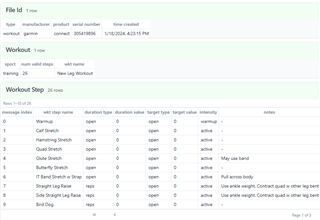
Hi.  I created a workout FIT file with custom step names using the Python fit_tool library.  After generating the file, I ran it through fitfileviewer.com and the file looks OK (below) as per Garmin SDK docs.  I then loaded the file to my Epix Pro II.  The workout shows up, but when viewing the steps, my custom step names don't appear.  They show as "Go" (the same as what I see with a Custom workout type created using Connect online).

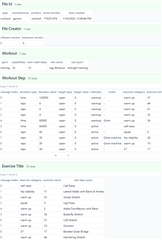
I ran a few Strength training workout FIT files that I created via Garmin Connect online through the fitfileviewer site and found a different Workout Step message structure (2nd screenshot) that contained an int in the exercise name column and another Exercise Title message structure containing lookups for the exercise name.  These message structures are not documented in the Garmin SDK pages, though I do see an exercise_title mesg_num in Profile.xlsx.  

I don't see any methods for creating message types other than the three in the SDK docs.  Anyone know how to generate these message structures?

Thanks very much.

My workout file:
Connect-generated workout file:
  • I hit this exact issue and found the fix. The SDK docs don't cover it, so posting here for anyone else stuck on "Go" showing instead of custom step names.

    The solution: add ExerciseTitleMessage records (message ID 264) to your FIT file.

    The watch doesn't use workout_step_name from WorkoutStepMessage directly. It looks up the display name by matching exercise_category + exercise_name against ExerciseTitleMessage records. Without them, you get "Go."

    Three things that matter:

    1. Each exercise needs a unique exercise_name integer (0, 1, 2...) on both the WorkoutStepMessage and its matching ExerciseTitleMessage. Same value = same displayed name.
    2. Set exercise_category to 65534 (UNKNOWN) — this forces the watch to use your custom text instead of a built-in exercise name.
    3. Message order matters — ExerciseTitleMessages must come after WorkoutStepMessages in the file.

    Bonus: timed holds vs rep counters

    For strength/PT exercises, WorkoutStepDuration.REPS gives a rep counter but no countdown timer. If your exercise has a meaningful hold (e.g. 30-second stretch), use WorkoutStepDuration.TIME with a repeat loop instead — the watch shows a countdown per rep. Use REPS for short-hold exercises where a countdown isn't useful.

    Python example using fit-tool:

    from fit_tool.profile.messages.exercise_title_message import ExerciseTitleMessage
    from fit_tool.profile.messages.workout_step_message import WorkoutStepMessage
    from fit_tool.profile.profile_type import ExerciseCategory
    
    # Workout step
    step = WorkoutStepMessage()
    step.exercise_category = ExerciseCategory.UNKNOWN  # 65534
    step.exercise_name = 0  # unique per exercise
    step.workout_step_name = "My Custom Exercise"
    
    # Matching title record
    title = ExerciseTitleMessage()
    title.exercise_category = ExerciseCategory.UNKNOWN
    title.exercise_name = 0  # links to the step above
    title.workout_step_name = "My Custom Exercise"  # this is what displays
    

    I built a full working generator for PT/rehab workouts (reps, sets, hold times, rest periods) and open-sourced it here:

    github.com/.../garmin-pt-workout-generator

    Tested on Forerunner 970. Should work on any watch supporting strength workouts.

  • Thanks.  After much detective work, I figured out the ExcerciseTitleMessage issue.  Why it's not documented, I don't know.  I also mapped my custom exercise name to an existing Garmin exercise ID and Category so that the watch was aware of the muscle groups used.