
This discussion has been locked.
You can no longer post new replies to this discussion. If you have a question you can start a new discussion

Scorecard Display Vers 3.3.3

I’ve updated to vers 3.3.3 this morning and this issue has been present since recent format change.

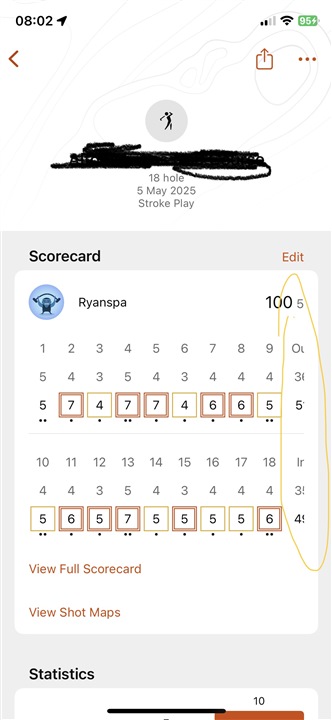
On my IPhone X (vers 16.7.11) the 9/18 hole totals are not fully visible unless I scroll right, which then hides 1/10 hole scores. Some might say that it might be better to hide the total based in my score.

My IPhone display is set to the lowest possible setting for font size. My phone is latest IOS for IPhone X. Can Garmin please allow  adjustment of the screen to fit the data.
  • The landscape is not working. v3.3.3 on iOS it doesnt detect phone rotation. 

  • This annoys the fu*k out of me. I can no longer screen shot my hole round and send to me friend.   

    fail.  

  • This annoys the sh*t out of me too. 

  • Wouldn’t it be great if Garmin responded or even just fixed it 

  • That would be to easy a fix. 

  • You can use the touchscreen on your phone to move the scorecard bracket over from right to left to reveal the section you circled in the photo above. You will then see that section slide over to reveal the rest of the scorecard. 

    Portrait orientation to landscape is not formatted into the Garmin Golf app by design and as with the Garmin Connect mobile app, orientation formatted features will display an icon of a phone sideways along with an arrow if the view within the app is compatible with changing the orientation. 

    The scorecard bracket is also cut off at the end when you select a scorecard due to the spacing from left to right, and using the touchscreen will allow that section to slide over from left to right.

    You can view the full bracket of the scorecard if you tap the "View Full Scorecard" option displayed right below the scorecard bracket. 

  • I want to share the full scorecard with friends. On previous versions than 3.3.3 was working to switch to landscape mode. at least on iOS. Now it's impossible. 

  • You can share the scorecard by selecting the scorecard from the Activity list > Then select the "Share" icon formatted on the next screen in the upper right of the window, just to the left of the three horizontal dots icon > You will then see options for sharing "Scorecard Gross"..."Scorecard Net"...etc. with many views to either screen shot or share as a formatted image through text message, email, etc. 

  • Yes, i know that feature, but is not possible to share the FULL scorecard including Player 2 score. It just share my score. When i play with a friend is usefull to share the full scorecard including my friend's sorecard, that's why i need the landscape mode on the "view full scorecard screen", that worked on previous versions as i already told. Thanks.

  • The stupid thing is that when I view the scorecard on my IPhone Safari browser I can see all the details but on the app I can’t. In the dscreen shot I posted, there’s strange things. Eg next to score 100 is ‘5’ , what is that because it’s not on web version and scrolling left to right doesn’t reveal.