This discussion has been locked.
You can no longer post new replies to this discussion. If you have a question you can start a new discussion

Garmin Explore Search Function Not Working

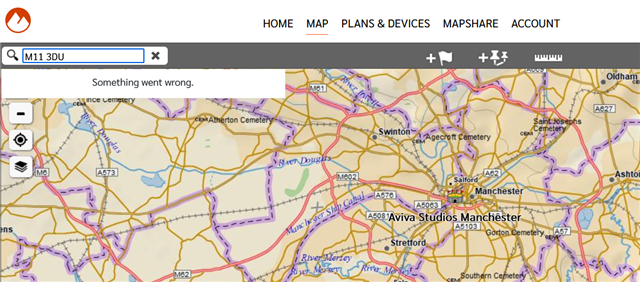
As the title says, had this for a week or two now when searching for anything on https://explore.garmin.com/Map in order to pin a new location on a map im continually getting "Something Went Wrong" as per the screenshot, tried contacting support who just kept using canned replies and not understanding what im trying to say, anyone else having this issue? Tried multiple devices, networks etc.
  • I first experienced this problem back in August.  I did speak to a Garmin support agent who said Garmin was aware of the problem and I would be notified via email when it had been fixed.  It now Sept 11.  Problem has not been fixed.  They're really cramping those of us who have become accustomed to using web-based Explore to help locate new destinations for our Garmin GPS.

  • yes ive had the same problem for a few weeks now, same same .. contacted support and would be notified but nothing yet.. 

  • We are aware of this occurring when attempting to use the search function on the Garmin Explore webpage map. If this occurs, please try using an incognito window or a different browser.

  • Tried both Chrome and Edge browsers on Windows 11.  Used normal and incognito mode.  Tried names and zip code searches.  Nothing worked.  Still get the "Something went wrong" error message.  Please help.

  • This sadly doesn't work at all, ive tried 3 different browsers, two different machines and multiple different networks, if you look at the network log you can see its timing out its on Garmins end, please could this be fixed its absolutley un usable as is

  •  It looks like when you last contacted our support team via email they replied requesting additional information from you to get this onto the support ticket. Can you please reply to that with the requested information so they can get you added accordingly? 

  •   I've added you to the current support ticket. 

    While we do have an open investigation for this, we do not have any updates on it currently. Please make sure to bookmark this thread as we will provide relevant updates here. **

  • This should have been resolved with the recent updates to Explore. If you are still experiencing this with the latest version, please create a new forum thread so we can continue investigating.