Hi,
I am experiencing two issues with Garmin Explore when importing a GPX track file.
Issue 1: Incorrect track distance
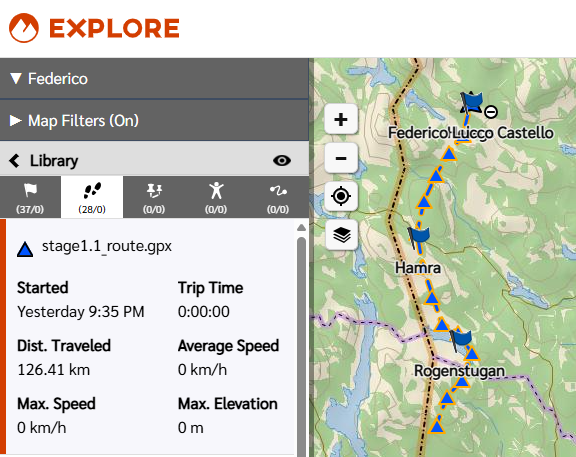
When I import a GPX file containing a <trk> element, the distance displayed for the track is significantly wrong. The track should be approximately 126 km, but Garmin Explore shows ~310 km as length.
Notably, the elevation profile chart for the same track correctly shows the x-axis ending at ~126 km, which matches the expected distance. This suggests the app is calculating distance differently in the track summary vs. the elevation chart.
Additional observations:
- The GPX file has been validated — coordinates are correct (WGS 84, lon/lat order) and the track consists of a single `<trkseg>` with no gaps.
- When using "Copy as Course" on the imported track, the resulting course correctly shows ~126 km, but the course only retains two points (start and end), losing all intermediate shape points.
- Adding `<ele>` elevation tags to the GPX track points has no effect on the elevation profile — the app appears to ignore them and use its own terrain data instead.
Issue 2: Track not visible in Garmin Explore desktop
The same GPX track file does not render in the Garmin Explore desktop application, while it does appear correctly in the Garmin Explore mobile app and on the Garmin map service (explore.garmin.com). No error message is shown — the track simply does not appear.
Troubleshooting already attempted
- Downsampled the track: from ~5900 points to ~590 points (keeping every 10th point) — no change in behaviour for either issue.
- Added `<ele>` elevation tags: to every track point with plausible values — the elevation profile was unchanged, confirming the app ignores GPX elevation data entirely.
- Used "Copy as Course" as a workaround — this gives the correct distance (126 km) but discards all intermediate points, making it useless for navigation.
File details
The affected tracks are publicly available here: share.garmin.com/U7YS77OR55, you can look at stage1.1_route.gpx as an example. Some additonal info on the files:
- GPX version: 1.1
- Created with: GDAL 3.12.0
- Track structure: single `<trk>` with single `<trkseg>` with ~5900 `<trkpt>` elements
- Coordinate system: WGS 84
Could you please clarify the following:
- How Garmin Explore calculates track distance for imported GPX files?
- Why the distance shown in the track summary differs from the elevation chart distance?
- Why "Copy as Course" discards all intermediate track points?
- What the rendering requirements are for the desktop application?
Thanks!