


Hi all. Setup: InReach Mini2, Android w/Explore App, Explore Web. This question is about using Explore Web.
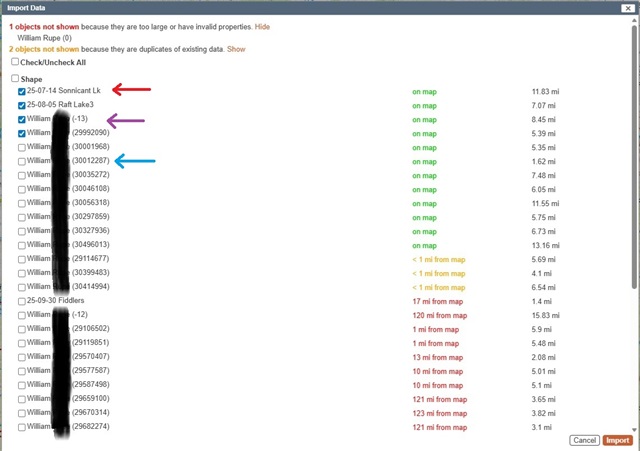
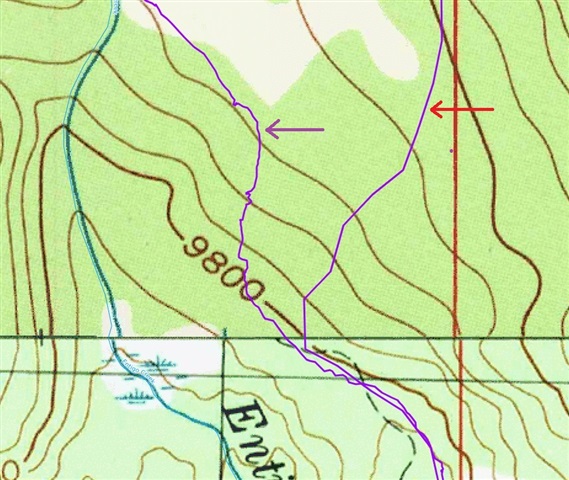
The red arrow in both images is an Activity that I converted to a route in Web then exported to my pute and then imported into a non-Garmin web software. It works and appears as one would expect and looks the same as a route I drew in Explore Web and imported in the same manner.
The purple arrow is a route/course/track or something that a few years back I also created from an Activity and converted to something somehow, but I do not know how I did this and have been unable to re-create it. It has many more points and resembles exactly the nature/shape of an Activity. I would like to be able to use this type of import again in the non-Garmin software as it shows exactly where I traveled, but I have no idea how I created it.
That file (purple arrow) and the file type represented by the blue arrow get exported every time in the GPX file even if I have hidden everything on the map screen entirely. The blue arrow files import as very course line, maybe lines drawn between 10 minute intervals. Where are they coming from? Is it not possible with Web to simply select one file and export it?
Import/Export in Web is so very confusing and extremely difficult to figure out.
Thanks,
William
