This discussion has been locked.
You can no longer post new replies to this discussion. If you have a question you can start a new discussion

Garmin Explore Map page not loading Tracks

For roughly the past week, I've been unable to see my tracks in Explore Web.
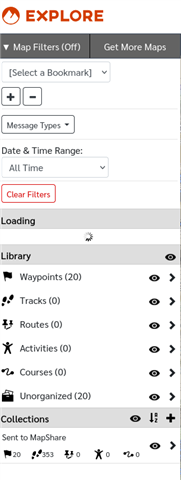
 

As you can see at the bottom of this screenshot, I have 353 tracks saved. They DO show on the map, but they never load in the sidebar - the spinner keeps going indefinitely (have left it for hours, no change). Same result across multiple browsers on multiple devices. Clicking a track on the map does pop up an info box, but does not load the track name and the edit and collections buttons are non-functional.

Obviously this severely degrades the functionality of the product. With it being across many devices, this looks like it's on the server side of things. I did a full reset on the device and re-synced it with no change.

  • More info: 

    - Clearing cookies and site data does not help
    - Using a private browser window does not help

  • On the (probably forlorn) hope that a developer actually looks at this...

    It looks like the browser is stuck in an endless loop of posting to https://explore.garmin.com/Map/Messages

    The JSON being posted is

    {"ToDate":"Invalid date","UserKey":null,"TypeRestriction":2,"Units":2}

    and the response is

    {"Messages":[],"MaxHit":false,"DeviceId":0,"UserId":0,"OldestTimeUTC":null,"NewestTimeUTC":null,"ColorCode":null,"TotalTextMessageCount":0}

    This repeats hundreds of times (apparently indefinitely) and meanwhile nothing else loads.

  • In my case, when I import a track to Explore web, the track list doesn't update correctly, and it shows 20 less tracks when I add one to one of my collections.

  • Things have changed slightly but not improved. Now the spinner goes away and the page stops making requests, but the tracks still do not load and nothing is editable.