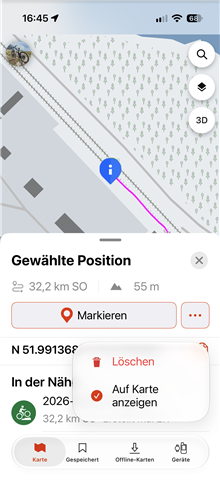
There is another usability problem with the new activity view in Explore 4.16.
When tapping the three-dot menu for a selected activity, “Delete” and “Show on Map” are placed very close together, as shown in the screenshot.
These are two completely different actions, and Delete is a destructive action. With the current layout, it is too easy to accidentally tap “Delete” when intending to select “Show on Map”.
I think there should be a much clearer separation between these two options. At the very least, a destructive action such as Delete should not be placed immediately next to a frequently used non-destructive action.
This is a usability problem rather than just a visual design issue, because an accidental tap can result in an activity being deleted.