Fenix 7X Pro + Garmin Explore - Constant updates and beep every 3-4 min during activities

Hi all,

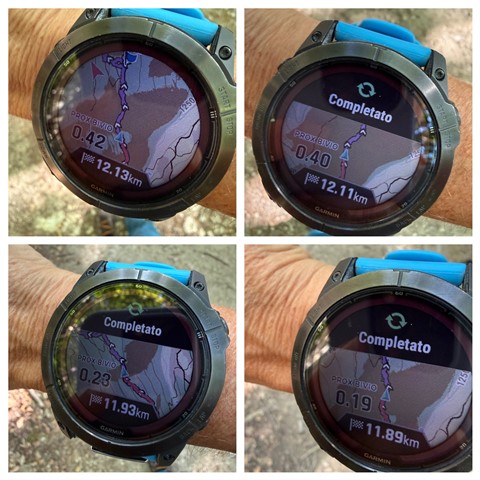
I'm getting continuous updates and an annoying beep every 3-4 minutes while using *Garmin Explore* with my *Fenix 7X Pro*.
It happens during *Hiking* and *Biking* activities.

The issue occurs both when I’m following a course/route and when I’m just walking or biking with no course loaded.
I haven’t changed any settings recently, but the watch still keeps updating and beeping even with no route.

Question:
How can I disable these constant updates/beeps?
Is there a setting in Garmin Explore sync, Activity Alerts, or Map settings that causes this?

Device: Fenix 7X Pro Solar Sapphire 26.09
App: Garmin Explore 4.14.1
Activities: Hiking, Biking

Thanks in advance for any help!
  • Ciao,

    I'm just guessing, because I don't have a Fēnix 7 and I don't know what settings you have on your Fēnix and in Explore.

    But I have a question:

    Why do you need to keep Explore on during activities? If you don't really need it, keep it shut down (shut down, not just in the background).

    If you really need Explore on, try this: go to the Devices tab (or Dispositivi, or whatever it is in Italian) and disable Sync Current Activity (or whatever).

    Fingers crossed

  • Thanks. I need to keep Garmin Explore running to follow the route with my phone mounted on my bike handlebars. I can’t really do it just on the watch. 
    If I disable the updates, I lose my position on the map. 
    I‘m pretty sure it didn’t happen in 2025. 

  • I’m not sure I understand. You

    • start an activity on your watch,
    • launch Explore on your phone, and
    • if you disable Sync Current Activity, you don’t see your position on the map in Explore (the blue triangle). Alternatively,
    • if you enable Sync Current Activity, you see your position but get those annoying updates.

    Correct?

  • Tried it again now to give you a proper reply.

    I start the watch.

    I open Explore to see my track on the map.

    Then I start the activity.

    If I choose "Sync", every 1 minute and 50 seconds it beeps and says "Completed".

    Of course, if I don't select Sync my watch does not beep.

    But in that case, how can I see my position on the map/route on the screen of the cellphone?

    The map on the watch is too small to my sight Disappointed

  • Ok, I tried now the same sequence with my GPSMAP H1 and Explore 4.14.1, and wasn’t able to reproduce the issue(s).

    If I disable Sync Current Activity I nonetheless see my position on the map (the blue triangle) in Explore.

    If I enable Sync Current Activity, I don’t get the beeps and the “Completed” messages (I let the thing run almost ten minutes).

    Explore seems to behave well in my setting, so the culprit could likely be the Fēnix software.

    Someone could easily suggest to perform a master reset on the watch (a Delete All, on my H1), and/or to reinstall Explore.

    This might work but, before that, you could post a message to the Fēnix 7 forum (Outdoor Recreation > Wearables > fēnix 7 Series), and see whether something relevant pops up at gpsrchive.com.

    Cross fingers again  :)

  • Marina,

    in Explore, tab Map, tap the button with three layers, then the button with the ellipsis and finally select Map Settings. If you scroll to the bottom of the page, you will see an option **Prefer Device Location**. What is its current setting? Is it on or off?

  • With **Prefer device location** turned on, Explore uses the location data that come from the watch; with **Prefer device location** turned off, Explore uses the phone's GPS.

    I can't check on my H1 now. Does anything (good) happen if you disable the option? Try with **Sync Current Activity** both on and off.