This discussion has been locked.
You can no longer post new replies to this discussion. If you have a question you can start a new discussion

Course point management in Garmin explore

Being able to manage course points on my Fenix 8, without internet connectivity, is important to me. (Course points are the ones that show up in “up next”)

the current iOS explore kinda supports existing course points and I couldn’t find a way to add new course points

Is there a way to do this that I haven’t figured out?

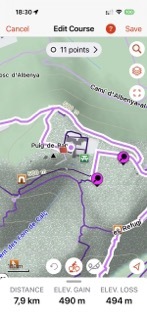
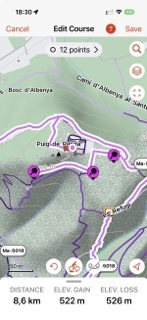
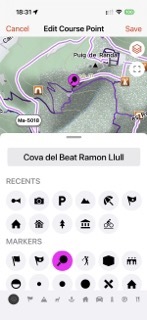
  • Edit the course which (was made in GE IOS), press on the line near a POI which you want to add and draw the new dot on it.  In the pictures you see a course with 11 course/shaping point, the course after adding a course point and the details of this course point. The name was taken from the POI. You can also add a course point anywhere, just by press on the line and after then edit a name and/or symbol.

    This works only when the course was created in GE IOS. Imports from eg. Komoot show only start and end point and can't be edited. Courses from Strave may have course points, but vanish when you add more with GE IOS. When courses made in Connect, you can add course points, but then you get this problem: https://forums.garmin.com/apps-software/mobile-apps-web/f/garmin-explore-ios/419092/garmin-explore-ios-suppresses-turn-by-turn-when-manual-poi-course-points-are-added

    EDIT: I can only upload one picture, which makes no sense. I try to upload later

  • here are the pictures:

  • Thank you. 

    That link to the other post actually clarified how Explore and Connect interact.

    Basically Explore tries to do everything in the App and Connect does it in the server (which is more powerful for Turn by turn, hence it removes Explore's TBT and replaces them)

    So if I ever get stuck without reception, I can use explore to create a quick route from scratch and add some points for reference but anything more substantial (like races with aid stations and such) I will need to maintain it outside of Explore.

  • Hi,

    Will later POI editing BE synchronized back to the watch?

    • tks
  • What is BE?

    When editing course points to wirh GE made courses, the changed course will be saved back to the watch. I presume that the added course point will be visible in up ahead. I forgot how to switch on the up ahead page. Maybe that page appears when you start to move.

  • when you are without reception, you can‘t create a course in GE. Or at least it is not calculated. But what you can do is making a waypoint, sync to the device and start navigation from there.

  • I tested - they do show up in Up Ahead (as long as they are not shaping points)

    I actually tested another approach - created a route on Footpath and exported as a GPX route (VS GPS Track which most apps do) and points showed up as Course Points in Garmin Explore

    They are "Shaping points" by default, so they don't show up on the watch, but if you rename them in GE, they will become non-shaping and will show up in Up Ahead

  • With Strava is a little better. In Garmin Explore and on the device you see the course points with Strava symbols. If i remember well, in up ahead even colored. Not only red like Garmin coursepoints. BUT, when you try to add more course points in GE, the Strava coursepoints vanish.

    How is it with footpath? Can you add coursepoints in GE?

  • be carefully with routes once they are "map" dependable so if the map on your watch does not contain a "knot" that the original map where the route was created had it won't work, unless you leave "automatic recalculate" set to on, which I never leave. 

  • be as in "to be".

    I create courses using PlotaRoute once it allows me to include also directional arrows symbols "IF I TRANFERS THE FIT FILE DIRECTLY TO THE GARMIN/NEWFILES folder. They will apear on the watch right before and at the point but won't show in the Up Head list.

    I'm afraid that if editing a course containing directional arrows synched to GEM to the watch GEM will strip them all in the way back. I'll test.