This discussion has been locked.
You can no longer post new replies to this discussion. If you have a question you can start a new discussion

Erroneous course point added when creating a course

When you create a course, Explore app seems to add an erroneous course point at the same location as the start of the course. See the following screenshot, it shows Point 2 which I did not add myself. I just created a course by clicking on the map, as evidenced by the shaping points.
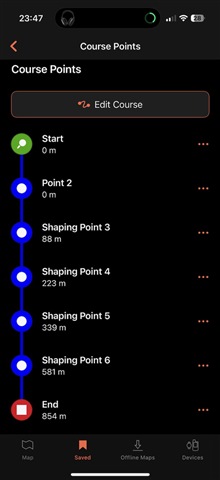
This erroneous waypoints results in the default course point icon being shown on my GPSMAP H1 when I load the course.

This is with Explore app version 4.7.1 on iOS.

  • We were unable to reproduce this issue. Please uninstall and reinstall the Garmin Explore app. If you continue to experience the issue after reinstalling, please give the exact steps you are taking in course creation. 

  • Thanks for looking into this. I reinstalled the Explore app, and initially I could consistently reproduce the issue.

    But then I changed the language of the Explore app (via iOS systems settings > Apps > Explore) to English, and since then I am not able to reproduce the issue.