This discussion has been locked.
You can no longer post new replies to this discussion. If you have a question you can start a new discussion

New Explore Course elevation profiles are terribly low

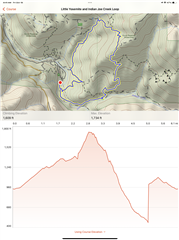
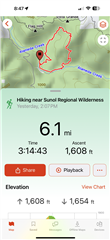
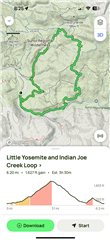
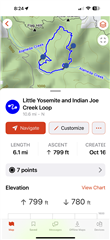
I tried creating a new course with the new Explore.  I usually do this by mirroring the AllTrails path and I keep that downloaded while traveling, just in case.  The old Explore tended to overestimate elevation profiles by 20-30%, but the new one seems to underestimate by over 50%!  That is enough to be almost unusable for hiking or backpacking, and enough error to actually be dangerous.  I double-checked by editing a single point in the course with the old Explore app saved on an old iPad, and sure enough, by editing one point, the elevation profile was mostly corrected.  I say "mostly" because there seemed to be a cliff created (far from the point I edited), and I've seen that behavior before in the old Explore app.  I usually also go move the cliff point and it self-corrects but I didn't do that this time.

Here is the AllTrails path, the new Explore course (note that it doesn't show start or end, either...another bug I guess), the old Explore edited course, and the actual activity (slightly low as I paused and forgot to resume for ~0.20mi).  AllTrails lists the elevation gain as 1627 ft.  The Explore 4 calculated course elevation gain is only 799 ft.  A single point edit in Explore 3 and the calculated elevation gain is 1609 ft (but note the "cliff" which I'd have to edit again to correct).  Finally, the actual activity measured 1608 ft gain.  FWIW I tested the new Apple Maps route creation and it estimated ~1700 ft but was missing trail segments so the route was wrong/longer than it should've been.

My best guess is the new course low elevation profile may be related to the loss of 20ft topo contour information in the new Explore TopoActive maps...and another reason the new Explore app needs changes to be acceptable for use.
  • It is not necessary to create a course to see the elevation problem. Just take a  contour line and tap on the map. Then in the new window you see the height of the chosen position. Sometimes it us 20% to low, so sometimes even 50%., eg. here: N 45.723659° O 10.906682°. If you use the topo pro map, the problem becomes even more obvious, where the height of a peak is shown, like here: N 45.720023° O 10.910887° .

  • Even when using the search function, the hight is wrong. If you search e.g for “Matterhorn”, in the list of results the hight is 3049 Mtrs. Correct would be more than  4.400 Mtrs. Garmin is aware of the problem and contacted me for further information 

  • one extrem example is here: N 45.557707° O 10.763561° By contour lines you can see that the peak us above 400 meter. Tapping on it, the height ist 227 meters. At the foot, the height can be higher than at the peak, depending from the tapping point. The peak is about 200 meters higher than the foot. When you plan a tour up, the  diagram looks almost flat.

    In my opinion, it is a hazzard, when you rely on the data and during an activity you have no more energy for the remaining slope or elevation.

  • Can confirm, I'm seeing this as well. Route in the Dolomites planned via Komoot shows 550m of ascent, course created in Explore 4.0 app shows 178m. Actual recorded activity (on GPSMAP 67) shows 690m.

  • There is one in my collections of 28K showing 65.535m (yes 65 thousands...)

  • Hi, I am new to Garmin and yesterday I tried to create a route and also my elevation profile is completely wrong, 900m (real) vs. 75m (explore). 

  • FYI for those of you seeing the issue, I emailed with @Garmin-Chris and there is now a bug report entered for this issue.

  • Incorrect elevations in the Explore app should be fixed in the next app version. 

  • Any idea of ETA?  This also breaks ClimbPro on all the Fenix and Epix line watches.

  • I have been told that the new version should be available very soon.