Course loops, change course issues, course points not helping

Hello,

Past few weeks the ability to draw or edit a map on Garmin Connect has turned into an exercise in futility. I have used it successfully for several years and it has taken a real nose dive in usefulness in the past few months. 

I am creating trail running maps off road. These are utilising well used paths using the purple lines so it is not like I am creating new paths through uncharted territory that Garmin maps has to really think about.

I am using the Most Popular mapping setting which is the default. 

A tiny tweak to change one path is now creating loops to nowhere. These new loops can never be removed as all edits to the loop just create duplication of the path you have already done, increasing the distance by making you go there and back. You just have to undo them and start again.

If you try and mix direct or most direct with a most popular map you get all sorts of crazy stuff where you just have to undo it as it is not a fully joined up map any more.

Most direct and it is even worse UX usability experience. If you try and move the end point to another path that is not the one that was originally selected, sometimes only a few meters apart, and it will create massive circular paths adding on hundreds of meters to the route and still not go to the point you want.

I have attempted to use course points to ensure the map keeps the parts I want and even this does not solve the problem.

It is hard to explain with screen shots, it would be best if I shared a private screen recording showing the problem to some of the developers.

  • Exact same issue here. It is not possible to edit or create a proper route since a few weeks anymore. As a workaround I use an external web tool instead and import the gpx to Garmin Connect Web. Not really the way I want to do it.

  •   I have emailed both of you to get some information so we can add you to an open investigation ticket regarding this. **

  • Thanks for posting this.  This issue has cause so much grief/anger for me as well.  I've noticed that "Most Direct" kinda works, but it'll follow the street instead of the sidewalk/path right next to it.  It's literally impossible to drag the dot to the sidewalk regardless of how zoomed in you are.  And like you mentioned, if you're on "Most Popular," don't even think about touching any part of the course unless you like loops.

    Here are some screenshots.  Here are some screenshots:

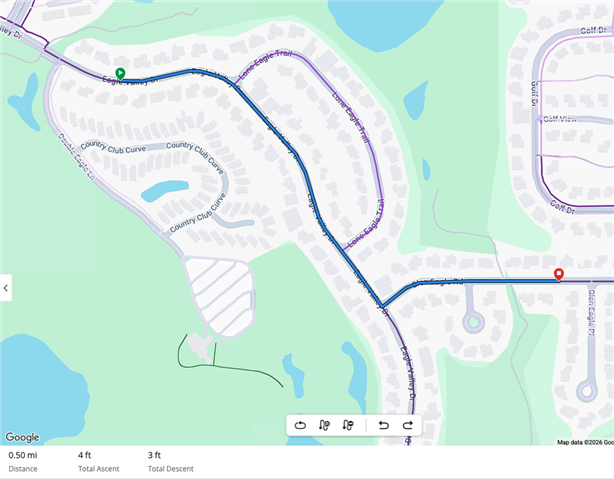
    Simple 0.5mi course:

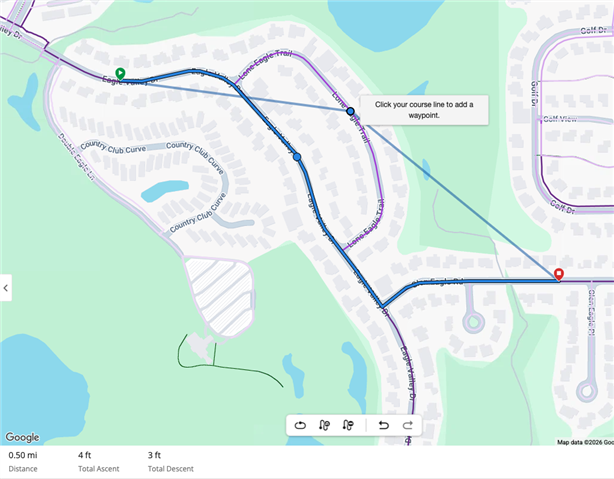
    I'm going to modify it so it routes along the curved Eagle Valley Trail:

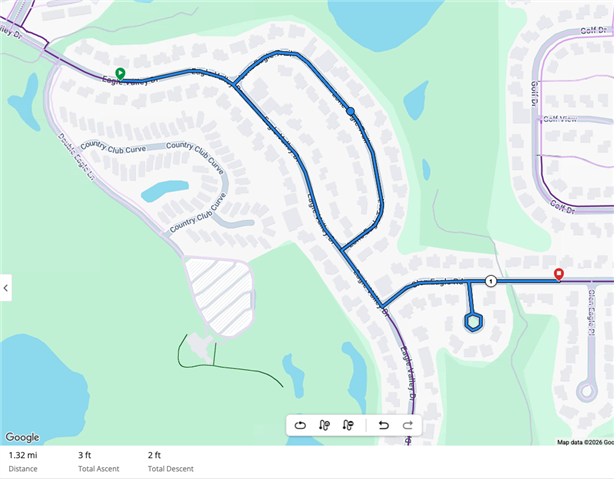
    Now we get all kinds of loops, including the cut-de-sac near the end point.  0.5 mi has now turned into 1.32 mi.:

     Feel free to email me as well.

  • Thank you for letting us know. I will be sending you an email.

  • I have similar problems and find the web editing next to impossible to use. When adding a new control point, I keep getting a route that goes back and forth along a road. It goes half a mile up the road, does a u-turn and goes back another half mile, only to do another u-turn and then continue as intended. It's impossible to remove this back-forth section.

    One issue is that when removing a control point, the route stays. It doesn't re-calculate as it was without the removed control point. So if for example you move the control point slightly you now get all kind of loops and back-forth you can never change.

    If you have a glitchy mouse button or you mis-click even the slightliest, you now also get all kind of loops and the control point moved and Garmin keeps all the old positions in place and routes through them.