Hello,
I believe I encountered a bug related to Exercise Load / Acute Training Load after my watch ran out of battery during a run.
On August 30, I was recording a run when the watch battery completely died before I could finish and save the activity. After I got home and charged the watch, I was able to recover and save the activity.
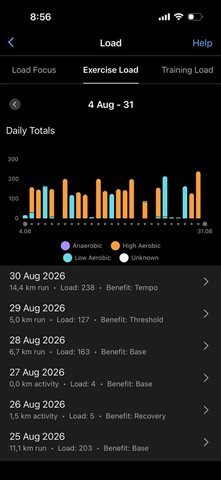
The activity itself appears correctly in Garmin Connect:
- Distance: 14.4 km
- Exercise Load: 238
- Primary Benefit: Tempo
However, the Exercise Load from this activity does not appear to have been added to my training load.
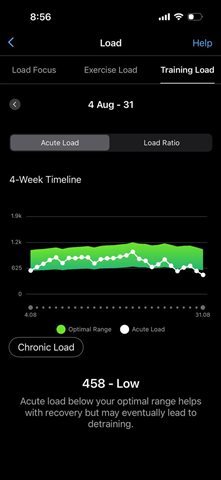
My Acute Load currently shows 458 - Low, and the 238 load from the August 30 run appears to be completely missing from the Acute Load calculation.
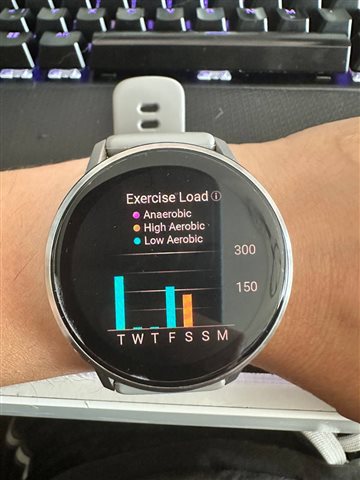
The issue is also visible directly on the watch. In the Exercise Load graph on the watch, there is no bar corresponding to the 238 Exercise Load from this run. This is despite Garmin Connect showing the activity itself with an Exercise Load of 238.
I have already performed a full synchronization with Garmin Connect, restarted the watch, and synchronized it again. The issue remains unchanged.
So there appears to be an inconsistency:
The recovered activity is saved correctly and Garmin Connect shows Exercise Load = 238, but this load is missing from the Exercise Load history on the watch and is not reflected in Acute Training Load.
This happened specifically after the watch powered off because the battery ran out while the activity was still being recorded.
I have attached screenshots showing:
- The August 30 activity in Garmin Connect with Exercise Load 238.
- Acute Load showing 458 - Low.
- The Exercise Load graph directly on the watch, where the load from the August 30 activity is missing.
Could you please confirm whether this is a known issue and whether there is any way to restore/recalculate the missing Exercise Load so that it is correctly included in Acute Training Load?
I would also be happy to provide diagnostic logs or additional information if needed.
Thank you.