New functionality: 'Epics' activity grouping

The ability to group activities together is now available in Connect. You don't need a Fenix 9 to use it. Function appears under the Activities menu option.

More information here: https://www.garmin.com/en-GB/garmin-technology/maps-for-smartwatches/garmin-epic/

Top Replies

All Replies

  • I made 2 Epics already. It is ok I guess. Just something different. It doesn't show up on the News Feed as one "item" so I don't really see the point or benefit.

    Like yesterday, I went to a track workout run group and there was running warmup, stretches, drills, cooldown, and some more stretched. I recorded them as separate activities. I made it into one Epic... The Epic is fine and they grouped together but only if I go and look at my Epics. On my News Feed the list only has the individual activities. 

  • It feels like it is half done and as it is today, what purpose does it really serve?

  • It’s designed to give you a collective view of a multi-day experience, with maps, totals, charts, photos, and notes. Then you can view and share it as one single adventure rather than a scattered collection of activities.

    To test it, I grouped runs in different ways, like the month leading up to a marathon or ultra, or combining runs from a vacation where we also did several day hikes and rides.

    I’ve seen plenty of discussions about Garmin users trying to record a whole multi-day hike in one go, only to end up with a corrupted file or other problems from the massive size of a single activity .FIT file. This should help reduce those issues, as long as they know it’s an option.

  • Earlier I've used FitFileTools to combine individual hike segments into one single hike. Now I tried to make Epics out of those (to get also sleep scores etc.). It kind of worked but I'm missing map trail in the Epic for those combined segments. Of course now epics make combining the segments unnecessary, but it's useful to know that at least now epics seem to work properly only for unedited activities.

  • what purpose does it really serve?

    Maybe I am just dumb but I cant figure out how to share an Epic besides copying the link... after changing the privacy to everyone.

  • On Garmin Connect Web, you can only copy the link, but on the Garmin Connect app, the share button gives you the usual options to post to your social media or send through messaging platforms.

  • I couldn't share my epic with my 'connections' (over the app) until I changed the privacy to 'everyone' even thought the privacy setting of each individual activity was set to 'connections'. 

    I hope this will be fixed.

  • how to share an Epic besides copying the link

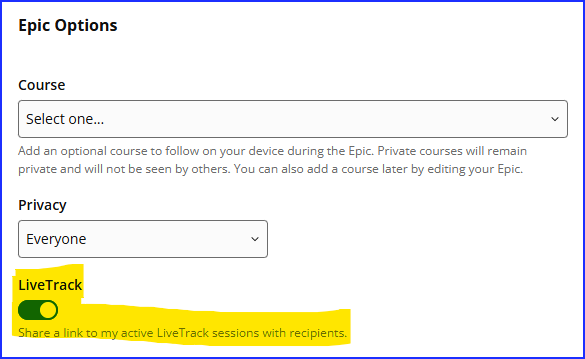
    Another option, when setting up the Epic you can toggle on the "LiveTrack."

    When recipients open the LiveTrack link, they’ll also spot a link to “Garmin Epic” if the activity is part of a live Epic event. This will include the GPS activity that triggered the LiveTrack email, along with a link to the currently active Garmin Epic.

  • I think it is really good.

    I've tried to do this before manually but it obviously wasn't going to be that great and involved a lot of fiddling about with GPX files and spreadsheets.

    Now I have all my own cycling grand tours documented and the stats pulled together for each one in one place.

    The consolidated maps and elevation plots are excellent.

    Also I shared the link behind the title with one of my followers and they were able to see the Epic without me having to change the privacy to everyone.   The documentation regarding this is confusing.

    However, it only seems to be generating maps for Epics going back to 2016, and the elevation plot always starts from zero so for skiing the information is all compressed at the top of the plot which is poor.

    It would be good if...

    - the route plots on the maps were a different colour than green since most of the map backgrounds are green.  Ideally there would be a heat map setting for the plots here like in the normal activities.

    - if in the grand summary there were individual totals for different activity types so that I can see for example how much skiing and cycling I've done separately.

    - it showed up in the News feed as others have pointed out

    - the amount of ascent/climbing was shown in the summary on the front page

  • We are always looking for ways to improve our features and products, Please submit this feedback to the following link so we are able to get this over to our team of developers: forums.garmin.com/.../2063206