I’m reporting several issues with the Health > Weight section of Garmin Connect Web.
1. Broken 1-year graph tooltip
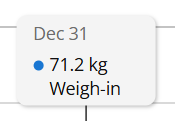
When selecting the 1 Year view for the weight graph, the tooltip displayed when hovering over a data point is broken.
Instead of showing a normal date, it displays:
NaN month.abbr.NaN
The graph itself is displayed, but the date information in the tooltip is clearly not being formatted correctly.
2. Historical date range is ignored by CSV export
More importantly, the Export CSV functionality appears to be broken.
The export always contains data from only the most recent 12 months, regardless of the date range selected in Garmin Connect.
For example:
-
Select the Weight section.
-
Change the graph/date range to an earlier period, such as a previous year.
-
Export the data as CSV.
-
The resulting CSV still contains the same data points from the last 12 months, rather than the historical period that was selected.
I have verified this by selecting different historical date ranges/years and exporting each one. The resulting CSV files contain the same recent 12-month dataset instead of the corresponding historical data.
This is particularly problematic because it means the web interface may display historical weight data, but there is currently no reliable way to export that historical data through the CSV export function.
Expected behavior
-
The 1-year graph tooltip should display the correct date for each data point.
-
The CSV export should respect the selected date range and export the data corresponding to that period, including historical data from previous years.
Environment
-
Garmin Connect Web
-
Health > Weight
-
1 Year graph view
-
CSV export
Could Garmin please investigate these issues? The CSV export problem is especially important as it prevents users from retrieving their historical weight data through the official export functionality.
Thank you.