This discussion has been locked.
You can no longer post new replies to this discussion. If you have a question you can start a new discussion

Merge Multisport in Single Activity

HI, I might be missing something in the web interaface, and don't want to mess up the route / stats

I did a 100k Ultra yesterday, but accidently started the logging of as Walk, at the first rest stop I changed it to Hike as I wanted the other stats showing on the watch like elevation, compass etc. This is now showing as a multisport, with the overall stats correct, but split as a 12k walk and 90k hike.

Can this be merged anyhow without losing any data?

The FIT file for both legs is the full data, so can't use any tools to merge the two.


  • Fit File Repair Tool will do it. Exporting a merged activity requires a Windows computer and a paid license. If that’s not preferable, you can zip your fit file and attach it to this thread so we can explore what’s possible.

  • That would be amazing, thanks, I wasn't sure about spending for the license in case it didn't work, and to be honest it was a mistake that I hopefully won't make again.

    Other tools work with the 2 separate tcx exports but I think I lose some sensor data (temp & cadence I think) so am trying to keep as much as possible, but as just a single activity. File attached, thanks for looking for me

    23246535743.zip

  • This will work - 23246535743_ACTIVITY-fixed.fit

    To import this into your Garmin Connect account, make sure to remove the previous multisport activity first, since it shares the same start time as the repaired file. Otherwise, you’ll get a message saying, “This file has already been uploaded.”

  • Thanks for that unfortunately the FIT file won't upload through the website. I've deleted the old one (so it's not a duplicate start time issue). I also don't believe it's a corrupted file out of the tool, as I've just tried to reimport the original file I sent you and that doesn't work either. No error message, just sits there after the import button is clicked and doesn't do anything,

    I've found another thread from late 25 with someone having the exact same issue.

  • I always test on my own account before posting the fixed file (I've done a lot of these). Just tested it again.

    You could try using a different browser, another computer, a different time of day, or even a different network. The file is quite large by Garmin standards (5,375 KB), which might be part of the issue. It took me about 15 seconds to upload with gigabit fiber Internet, so that definitely makes a difference.

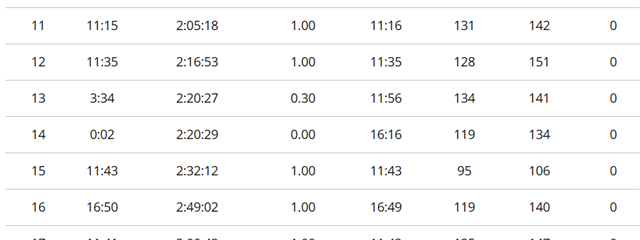
  • Actually got it to load now, everything looks good apart from elevation which seems odd (mainly 0s in the lap data) and also the lap data is out of sync where the 2 activities swap. Screen grab below

    Thanks for your help so far :)

  •  Try this one - 23246535743_ACTIVITY-fixed2.fit

    I’ve cleaned up the file so the lap data is no longer out of sync where the two segments met, and I rebuilt the laps into consistent 1 km splits.

    The only thing that won’t show up is lap‑by‑lap ascent/descent. Converting the activity from multisport into a single hiking activity requires running it through FFRT, and that process rewrites the activity/lap structure. Once that structure is rewritten, Garmin Connect can’t calculate ascent/descent for individual laps anymore.

  • Thanks again for your effort on this. I decided to stick with the multisport version, it was either that or lose the lap on lap elevation data. Note to self, make sure to start the walk with the correct activity selected!