Corrupt fit file repair request

Hi team,

Data in the multisport activity .fit file for my half Ironman is corrupted.

I've tried all the suggested fixes on this forum (including donating to Gotoes for full access) except for Fit File Repair Tool (as I have a Mac I can't seem to access that).  Each time there's still something wonky with the file (e.g., the swimming leg shows up as a cycling leg).

Would anyone please help me to fix this?

Thanks very much.

Best wishes,

Dominic

2026-05-03-08-31-36.fit.zip

  • Would anyone please help me to fix this?

    It might be possible. Assuming this was a standard half Ironman, can you give me the distance and time for each leg including swim, bike, run, plus your T1 and T2 times?

    I've tried all the suggested fixes on this forum (including donating to Gotoes for full access) except for Fit File Repair Tool (as I have a Mac I can't seem to access that)

    Fit File Repair Tool is built on a Microsoft Access database, so it only runs on Windows desktop systems. Also, without a license, FFRT is view‑only. You can inspect a FIT file, but you can’t export or save the repaired version.

  • Thank you for the reply.  Yes, it was a standard half ironman.  The official race stats were:

    Leg Time Distance
    Swim 40:10 1.9km
    T1 9:47 n/a
    Bike 2:50:06 90.3km
    T2 4:09 n/a
    Run 1:54:28 21.2km

    Thanks again for anything you can do to help.

  • The file you attached had some structural issues, but I repaired it using FFRT so Garmin Connect will accept it.

    2026-05-03-08-31-36-fixed2.fit

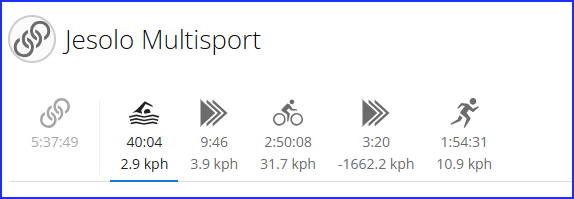
    FFRT is unable to create a 5-session activity from 3 sessions. So, the workaround is that after you import it, you’ll need to manually rebuild the multisport legs inside Garmin Connect Web

    • Open the activity in Garmin Connect (web).
    • Click the pencil icon in the top right.
    • Choose Edit Legs.
    • Use Divide Leg to split the first leg into Swim, T1, and Bike
    • Adjust the boundaries until the times match your race.
    • Save.

    Garmin Connect will then display a full 5‑leg multisport activity, even if the original FIT file didn’t contain all five sessions.

    You should get something like this:

    If this issue happens often, consider contacting Product Support through their website at https://support.garmin.com.

  • You're a star!  Thank you so much.  I didn't know you could split up the legs like that on Garmin Connect.

    All the best,

    Dominic