This discussion has been locked.
You can no longer post new replies to this discussion. If you have a question you can start a new discussion

How to remove segments on Connect mobile?

Hi all, I am not able to remove segments NOT created by me, on Connect mobile....

These segments are not on the Connect web, and not on watch F7x as well.

They are only on Connect mobile (Workout > Segments) and are not selected as preferred.

I tryed but was unsuccessful.

Thanks for your help!

  • You can't. Just don't look at them.

  • Ok, now it's clear. Thanks!

    But please, do you agree with me that the list of segments that you see in Connect App are embedded in one route in which you have created one segment by yourself, in that route? Otherwise you should make appear millions of segments. 

    Instead, in Connect Web, you can see all the segments in the tab "Segments nearby" depending on the zoom of the area, of whatever area.

  • It works in a similar way in the phone app too. Just, when you want to see all segments available in certain area, you have to tap the Search icon (magnifying glass), select the area on the map, and then tap the button List, top right.

  • In the app you see all segments you've crossed created by anyone. If you click any of them you see your best time for that segment, but only if you got Segments enabled in Privacy settings.

    If you know about any other segment that you've crossed that isn't in that list then that is likely a bug. Double check that you enabled Segments in Privacy Settings and that you see the segment in an activtity and that it is missing in that page and if you locate that segment in Nearby segments you don't see any time for yourself.

    It might also be that if you turn off Segments in Privacy settings you will not get the full list of Segments. I've tested turning it on and off, but still see all Segments no matter the setting. Maybe it takes some time for the list to update to the correct view. If I got it turned off I don't see my time for the segment. When I turn it on again I see my best time.

  • Privacy settings in APP or WEB? Because I can't find Segments enables or disabled in APP, only in WEB.

  • In the web. The settings in the web is used in the app.

  • Ok, now it's clear. 

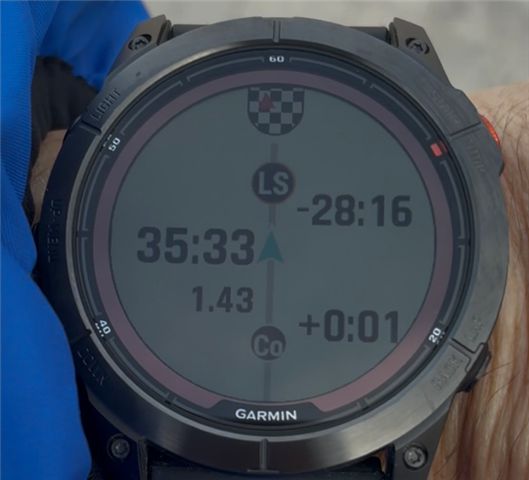
    Yesterday I got this screen below:

    Can you explain me what are the different numbers meaning? Ls, Co, ... ??

    I can only recognize 35:33 the time since the start of the segment, 1.43 the distance to segment finish. 

  • I don't know, but I can guess from my searches and this page for Edge 840: Racing a Segment

    "Co" might mean one of your connections in Garmin Connect and the time they have set.

    "LS" could be segment leader. On the 840 is says SL which is more logical. Are you using English as the language on your watch?

  • Clear... when you say "connections" you mean all the people that I see in the leaderboard? In this case I see 464 guys. How can I determine which one is it?

  • With "Connection" I mean one of your connections that you personally are connected with. Garmin recently renamed that to Friends and Followers: https://connect.garmin.com/app/friends/followers