This discussion has been locked.
You can no longer post new replies to this discussion. If you have a question you can start a new discussion

Nearby Courses Always revers back to Olathe when Searching

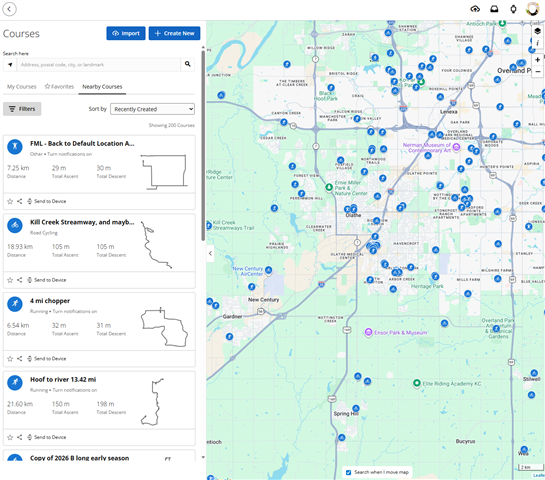
When I'm using the "Courses" feature in Training and planning, each time i look at a course, decide its not what I want, then go to look at another course in the area, it always defaults back to the same location in Olathe. 

The I have to start the search all over again. This happens every time. I am not using the back button, I am simply using the "x" i con on the tab which comes out on the web app. 

This feature is either broken, or has been left to rot by the design and development team, and is contributing to the reason why I have cancelled my Garmin Connect + subscription. There is not enough effort being put into maintaining these apps for the cost we are paying. Too many faults have been reported and not fixed.

I have taken my money to AllTrails for now to get a better service
  • This feature is either broken, or has been left to rot by the design and development team

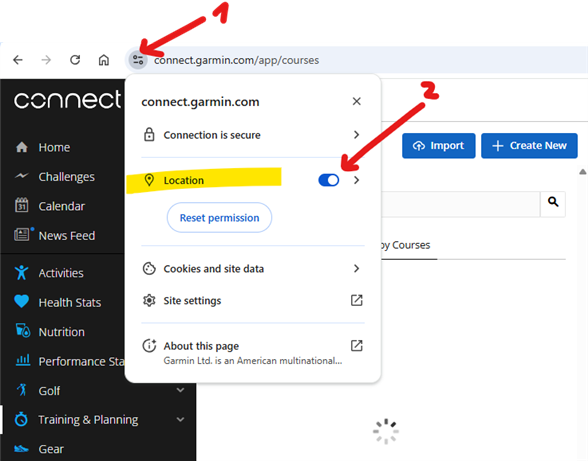
    ... or you just do not allow to use your location. Double check the permission, and enable it if not already done:

  • Yip already turned on. I could see it being a factor to where the default centre of the map is. But still defaulting to Olathe. Also wouldn’t help if I’m not searching in my current location.

    App design shouldn’t rely on location services being enabled or disabled to be a deciding factor if the page resets every time the user wishes to view another result from that search

  • Yip already turned on

    Then it must be some system-wide setting, or browser, extensions, anonymizer, or VPN. The map centers always in my current location when testing with Chrome, Edge, Firefox, and Opera. If you are on a Windows PC, check whether Location Services are on, in system settings.

  • My map is always centered over my location.

    I did a test and disabled location access for Garmin Connect and then I ended up on Olathe when I clicked the X while viewing a course.

    Post a screenshot of your settings for the web browser.

    This is from Chrome on MacOS.


  • Potentially have blocked location on a company device, but I think we are focusing on the wrong issue here.

    Even if the web app showed where i was, lets say Toronto (or anywhere), but if I am searching for courses for when I'm going on holiday in Singapore, why does it not stay in Singapore when I exit out of one of the course search results I'm looking at, then want to view another search result in Singapore? Why does it close my search and fly me back to "Toronto", I have to start again?

  • That is just how it is designed so not a bug. We can't fix that. It would be a great improvement if it instead stayed in the new location. Suggest it to Garmin: https://garmin.com/ideas

  • May as well close this point up then. 

    I don't think the Garmin apps need any new things.   I think the designers and the developers should try and focus on fixing the issues they already have and cannot fix, like a premium running watch that doesn't give you running splits every 1km - only total calories, twice. Unable to change lap alert fields for run activity FR 965 - Forerunner 965 - Running/Multisport - Garmin Forums . Or is this also just designed like this, so not a bug?

  • Or is this also just designed like this, so not a bug?

    Odd question when you know the answer. Submitting ideas doesn't mean they will drop everything and implement that.

    Have you submitted a support case for that bug? Writing in the forum is not the place for reporting bugs.

  • Or is this also just designed like this, so not a bug?

    I can't tell, since I do not have any FR965, and on my Instinct 3 it works as expected, but if you find a bug, then there are basically three main ways to report it:

    1. The most obvious - report it to the Product Support through their website https://support.garmin.com. 
    2. The least efficient - post it to this forum. You may get some workaround tips from fellow users, and also some sympathy from users coping with the same problem, but getting help directly from Garmin here is uncertain.
    3. The best one - sign up for the Beta Program, install the latest beta firmware, and if the bug is still present, report it on the dedicated Beta Program Bug Reports subforum for your model. This is the closest way to get your report directly to the developer team, enhancing so the chances to be looked at.
  • Yip. Multiple times. First time 6th Jan 2025 on software version 21.22

    I don't expect them to drop everything. But 15 months you think they would have made some progress based on the amount of people who have also comment on it