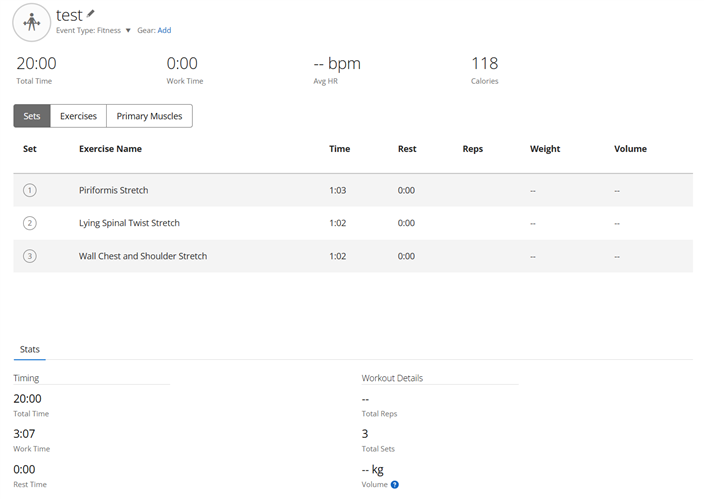
workout set time

I notice that the Minutes and seconds in the Workout set times when looking at your activity are interpreted as Hours and minutes by the Heart rate graph below the workout.  This results in incorrect alignment of the work out with the heart rate data.

The times seem to be interpreted correctly everywhere else as the workout and set elapsed times are correct.

In the graph my 1:03 step is shown as equivalent to a 1:03:00 step.   This make the workout on the graph 55 hours long but is only displays a graph length for 55 minutes.

notice that the 1:03 stretch exercise is displayed the entire duration of the workout so no other exercise is displayed.

I have reported this as a bug to Garmin.  I just want to know if I am doing something incorrectly.

  • I need to add one thing.  This seems to only happen on MANUALLY entered workouts.  All workouts tracked by the watch seem to be fine.  I have compared a tracked work out and a manual workout and see no difference in the data but the graph fails on the manual one.

  • I tried to replicate it - I manually created a Strength Activity, entered the total duration of 20 min, and then added the same exercises as you. I see no discrepancy in the stats - they show the Total Time of 20 min, and the Work Time of 3:07, which is exactly what was entered. Though, I get no HR graph at manually added activities. I wonder how you did it, since normally there is never a HR graph at manual activities.

  • Here is my process. 
    I do the workout.  In my case it was at 4:30. 
    not activated on my watch because my trainer switches it up. I could use free but always forget. 
    later on I create or midify the workout and send it to my watch. 
    on the watch I just hammer through the workout by starting it an repeatedly hitting next. 
    then stop and save. 
    this gives me the workout activity in connect. 
    Now I edit the workout including changing the start time to match the workout actual start time. This aligns the graph to the workout. 
    now I edit the exercise set/step times and rest times.  These are basically close estimates. 
    this is where the error creeps in. 
    the total working time and rest time are all correct. But the graph takes the minutes and seconds as hours and minutes. 
    I verified this by removing the minutes and the times on the graph became reasonable but my entire workout working time became 55 seconds. 
    when the workouts are recorded by the watch, all times are reasonable including the graph. 

  • So you do not use the function for adding an Activity manually, rather just record a fake one lasting a few seconds, and then edit it. That won't work for aligning the HR. I recommend either preparing the Workout in advance, and then executing it, or as you wrote, using the Free Workout feature, recording the entire duration of the activity. I do not understand what you mean by "the workout is not activated because my trainer switches up", but there is certainly a way to get the workout to your watch, and execute it (or use the Free workout).

  • Technically no.

    This does not change the fact that the times manually entered for the step duration are plotted as hour:Minute instead of Minute:Second.   I have verified that this does happen when the times are entered manually.

  • Perhaps this video will demonstrate the issue I am seeing

  • Technically no.

    Technical no what? Slight smile

    The video is rather blurred, so I cannot really see well the timestamps on it. Please rather post a link to the activity, so that I can look at it. Do not forget to make it public (click the padlock icon top right).

    Anyway, as I wrote, the way you use the watch, is not really what it was designed for. You best either start a prepared Workout and execute it properly, or record a Free workout with the full duration. Recording a fake activity of a few seconds, and then editing it, makes no sense, and the metrics the watch normally measures during the activity, will be completely skewed. All in all, I strongly discourage you from continuing in that way.

  • I am well aware that this in not standard practice. That does not negate the fact that the results are incorrect on the graph. There is a bug in the code. Regardless of how I got there the result is incorrect. 
    the option is there to manually enter the activity so it should have the correct result.  That’s all I’m saying. 

  • the option is there to manually enter the activity

    Yes, there is such option, and it works correctly, as I have shown in my initial post. However, you do not use that option. You did not create the activity manually. You recorded a fake activity of a few seconds, and then changed the duration of the exercises artificially, which is definitely not the way it is supposed to be done.

    And also your interpretation of the times is wrong. The duration of individual exercises is not in hours. It is in minutes, exactly as it should be. The problem is that you recorded only slightly more than a minute of heart rate, so when you edit the durations of individual exercises, only the first one of ~1 min fits into the chart. Only a few seconds of the second exercise is shown on the graph, and the remaining exercises not at all.