Garmin app not syncing with web

I have already followed all the instructions in here  Troubleshooting guide for (some) data missing after syncing 

My Forerunner 245 will sync with my Garmin connect App on my phone. 

It shows live data such as HR.

I have followed  Troubleshooting guide for (some) data missing after syncing and completely removed the device from my phone, app and web.

I've added the device back to the app, it syncs with the web but the web, web shen shows the device and says the device was last synced 2 weeks ago.

I presume graphs on the connect app are fed by web, so the data is synced from watch to app, app to web, web then feeds the data back to the app for creation of the graphs and that is why I'm not seeing any body battery or sleep data. 

  •   - I'd like to get a better idea of what all data is uploading to your Connect app, and what is missing from the website. Can you please post some screen grabs from each, omitting any personal information. Please also try using a different web browser; that will help us narrow down if it is maybe a cache issue. Let us know how it goes and we can continue to investigate accordingly.  ^DK

  • Here is a screen shot, there is no data, and you can see the watch hasn't synced siince the 3rd of March.

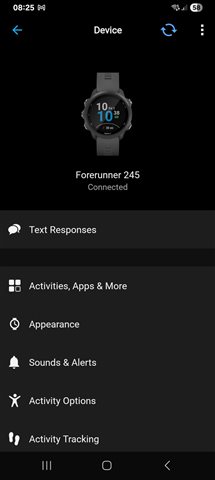
    This is the connect app, watch connected and syncing.

    This is sleep data, you can see it stopped around the 3rd of March, when web last synced with the watch.

    And that ties up with garmin web, and thisis what makes me think the app graphs use data from web. 

    Because I have the live data from my watch showing on the app. 

    So it seems that my watch and app sync and communicate with no problem, but the connect app is not sending the synced data to web.

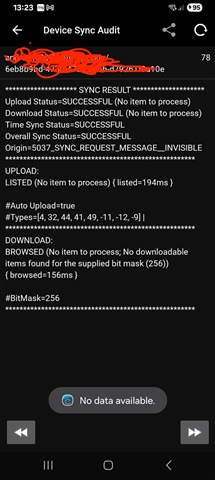
  • Did you try syncing with Garmin Express on a computer, to see whether it syncs at least in that way? With Express there is also a slightly better chance to get some verbose error message in case of connectivity problems. Though if you use the Connect app on an Android phone, you could perhaps fins some clues in the Device Sync Audit logs too.

    Also, when you tap the sync symbol at the top of the app screen, does the white ring around it close at the end of the sync, or does it remain open before timing out?

  • I have tried Garmin express on a Mac but USB storage devices are disabled for security reasons. My own personal laptop is Linux and so that's won't work. 

    I do have the Connect app on Android, how would I find the Device Sync Audit log?

    When I hit sync, the white circle goes to about 1 o'clock, the arrows inside the circle spin, the circle then turns green with a green tick and then a second circle drops down twice in the middle of the screen, looks like the screen refresh notification. 

  • how would I find the Device Sync Audit log?

    ... More » Settings » Device Sync Audit (at the very bottom)

  • My own personal laptop is Linux and so that's won't work. 

    You should be at least able to see the storage of the watch (you may need to install an MTP driver for that). Check the folders //GARMIN/Activity/ and //GARMIN/Monitor whether they contain any unsynced fit files. You can try importing them manually at https://connect.garmin.com/app/import-data. Some of them may be corrupted, blocking the syncing, so when you attempt to import them, you may get an error. Removing or fixing that file would then likely help unblocking the syncing, if that is really the reason for it.

  • In the Activity folder, the last activity is the 3rd of March, which is showing in Strava and connect web, coincidentally, that is the last time I had sleep data sync. And that is the last activity that I would have recorded. 
    There are files there dating back to 2024, could space be an issue?
    In Monitor, the last I have is the 9th of March, there are 3 files, I've uploaded all three and I'm now seeing sleep data for the 9th of March in Web and app.
  • When you open your profile in Garmin Connect Web (click your avatar and then View Profile), does the long cryptic ID on the address line of the browser exactly match the id from the second line of the sync audit?

    There are files there dating back to 2024, could space be an issue?

    If there is no space remaining, then it could be a problem. How much free space do you see on the storage? When you record a new activity, does it save on the watch, and does it sync to Connect? If I understood well, you did not attempt to record any activity since March 3, so try to record and save one to see what happens.

  • I've just done a dummy activity, a strength session for 1 minute, it synced and is visible in Strava, Connect web and Connect app. 

    The cryptic ID's match.