I am using Garmin Coach training plans to prepare for a bike race. I am using a Peloton to train and use syncmyworkout to ensure the data makes it into the Garmin Connect app. My current process is to start the Garmin Coach suggested workout on my Venu 4, broadcast HR to the Peloton, and ride the Peloton as just a free ride, adjusting my resistance and cadence to match the prompts on my watch.
When I finish the work out, I end it on both the Peloton and the Venu 4. This gives me two workouts in my training plan in the connect app. The workout from the watch is recognized as the training activity, without any data other than the HR. The Peloton workout shows up in the Garmin Coach training as "Entertainment RIde" ride next to the training ride; I do have to categorize this activity as "training" instead of the default "uncategorized" first. The connect app is double counting my activity minutes for both rides - so if the ride is 30 minutes, I have two 30 minute rides and the app says I rode for 60 minutes total that day.
How do eliminate one of these workouts so the activity minutes are counted AND the coach recognizes I completed the training ride? Ideally, the workout from the watch, with only HR data, is removed, but the data from the Peloton (which includes power, cadence, distance, etc plus HR), would stay and count as the training ride.
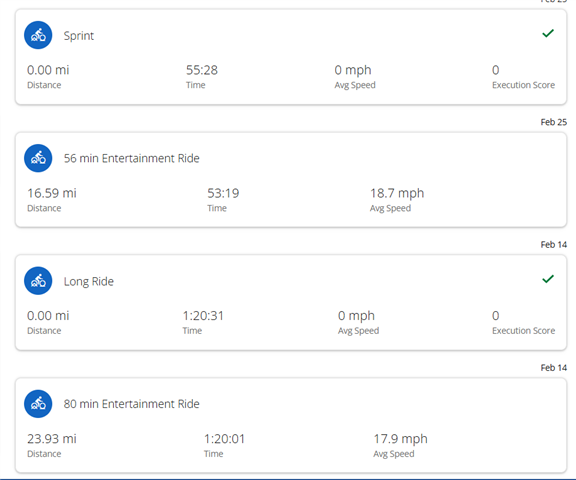
You can see in this image from the training plan how the duplicate activities show up. The green check activities count towards the plan, but only contain the HR data. The activity below the green check is the Peloton data that has all the info I need the training plan to analyze and react to.
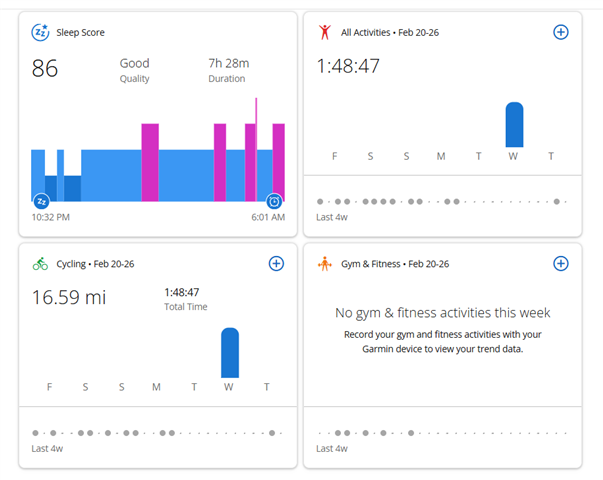
For what it's worth, the training plan seems to be adapting appropriately form the Peloton data, but the home page summary double counts the time of the coexisting activities like shown below. My home page should only show ~53 minutes of activity, not twice that amount.