


Yesterday I had a training session inside the stadium so on the watch I chose Track Run. While running on the 1st lane, I had forgotten to change the lane on the watch Track Run settings and as a result the whole workout was recorded as if I was running on the 8th lane. At every turn of 400 meters I manually pressed the lap button. After the end of the training I saw the laps and instead of 400m in each turn, it read 450m or 460m (logical since the watch was set for the 8th lane). I did 20 turns on the 1st lane, which means that I did exactly 8000m. But the watch recorded 9078m, so all the data such as average pace, pace per lap, etc. were calculated incorrectly.
In Garmin Connect I edited the activity and changed the total distance from 9078m to 8000m. But the laps continue to appear as 450m or 460m, instead of 400m which would be the right thing to do, as shown in the 1st image.

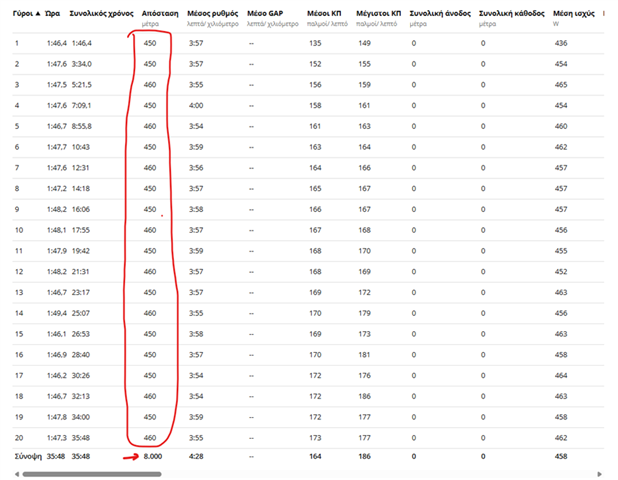
So my question is if there is a way to correct the laps to show 400m.
Searching the internet I found some tools that edit .fit files, like this: https://fitedit.io/get/
But the problem I encountered here is that as shown in the 2nd image, I will have to manually change all the distances at all the gps points recorded by the watch so that the final result comes out 8000m instead of 9.077,36m
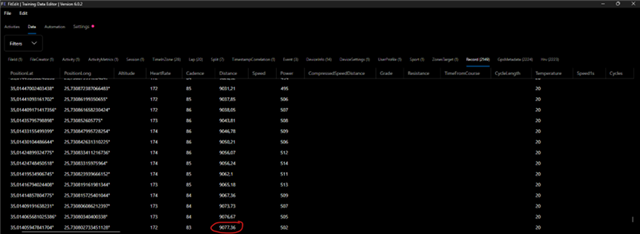
It would be much easier if, for example, there was an option to change to the .fit file recorded by the watch, the lane from the 8th to 1st and automatically calculate all the laps from the beginning. But since this is not an option, I ask if there is any quick way to change the distances of all the laps.

