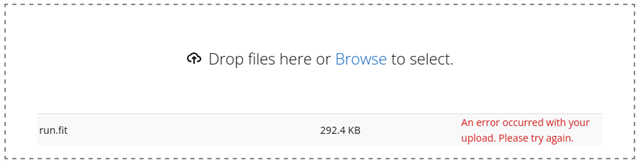
Cloudflare blocking me from uploading fit files

Opening dev tools:

Sorry, you have been blocked

You are unable to access connect.garmin.com

Why have I been blocked?

This website is using a security service to protect itself from online attacks. The action you just performed triggered the security solution. There are several actions that could trigger this block including submitting a certain word or phrase, a SQL command or malformed data.

What can I do to resolve this?

You can email the site owner to let them know you were blocked. Please include what you were doing when this page came up and the Cloudflare Ray ID found at the bottom of this page.

  • I was also blocked from posting on the forum, but that seems fixed now?

    Anyway, I have an activity on my watch that just refuses to sync to Garmin Connect. I have downloaded the .fit file, made sure it is valid by checking it on fitfileviewer.com. But whenever I try to manually upload, I get the "An error occurred" above.

    Looking at the Dev Tools, I see HTTP 403 Access Denied, and when I open the Response it seems to be a Cloudflare block page.

  • Converting to a .tcx file and then uploading DOES work by the way. But the conversion loses a lot of data in the process to the point of the file become unusable. 

  • I was also blocked from posting on the forum, but that seems fixed now?

    It's unlikely that whatever problem you had posting recently was instantly fixed. It's more likely that when you successfully posted your reply, there was something subtly different about it that avoided the cloudflare error.

    I say this because there's still ongoing issues with the forums, but they apparently only affect a minority of posts now. Long posts which contain parentheses and various types of formatting (like bold, italics, large text, etc) seem to be more likely to be rejected than short posts without much formatting.

    Anyway, I have an activity on my watch that just refuses to sync to Garmin Connect. I have downloaded the .fit file, made sure it is valid by checking it on fitfileviewer.com. But whenever I try to manually upload, I get the "An error occurred" above.

    Looking at the Dev Tools, I see HTTP 403 Access Denied, and when I open the Response it seems to be a Cloudflare block page.

    Did you use a Connect IQ data field which records to the FIT file?

    It would be funny if it records a field with a name containing text that cloudflare doesn't like for some reason (like "alert" or some other built-in javascript function name).

    If it's the case that you recorded with a new Connect IQ data field that does record data, you could try to use https://fitedit.io/ to look at the FIT field name(s) and possibly edit them.

    You could also use it to try to find and edit any other textual data that could be causing the problem.

    If it's not textual data that's triggering the error, then you're probably out of luck. (Because it will probably be impossible to figure out exactly what the problem is.)

    Unless ofc you contact Garmin support directly and send them the problematic file. Then they might be able to help you.

  • There are no custom Connect IQ Data Fields. It's just a regular Running workout, imported from Runna, with the name "W14 - Thu Tempo Half Easy, Half Tempo." I have edited the name to something more "safe", without dashes or the comma but that doesn´t resolve it.

    This is a run like any other I've done dozens of times before. The fact that the run also refuses to sync from my watch to Garmin Connect makes me suspect that *something* is wrong with it but every tool I've used so far confirms it is a valid file with no issues.

    Update: I used the Subtractive Repair method of the FitEdit application and now the upload works. So many thanks for the suggestion! NO idea what the difference between the two files is though...

  • Wow, glad it worked! I def learned something new.

    NO idea what the difference between the two files is though...

    If you are interested and comfortable with python, you can use one of the tools in this package for converting FIT to JSON or human-readable text:

    https://github.com/polyvertex/fitdecode 

    If you convert each of FIT files to JSON or human-readable text, then you can use a file text comparison tool like https://www.textcompare.org/, Beyond Compare, or the diff tool in VS Code to compare the two outputs.

    Maybe this will give you some ammo for Garmin support, if you decide to mention the problem to them.

    I still feel like there wasn't anything literally "wrong" with the file, other than some of data in it coincidentally happens to trigger some anti-malicious code protection in Cloudflare.

    Like, even if the file was damaged, you shouldn't be getting a *cloudflare* error. That cloudflare error indicates that cloudflare thinks you are trying to literally attack Garmin, not that you uploaded a FIT file that's simply broken.

  • It might be the workout notes that Runna adds, which are also present in the Notes field. Never had an issue with that though, so not sure if that's it.

    Half Easy, Half Tempo with Runna White check mark

    1km warm up at a conversational pace (no faster than 5:25/km)

    5km at 5:05/km
    5km at 4:30/km, 90s walking rest

    1km cool down at a conversational pace (or slower!)

    Great Breweries Marathon Plan (Week 14/26)

  • Well, parentheses and numerals are known to trigger cloudflare protection in the forums. It's almost as if certain text that looks like code is suspicious to cloudflare. There's no rhyme or reason that we can easily discern, although obviously there must be some deterministic algorithm that we just don't know about. Sometimes one large post that triggers cloudflare protection will be accepted if it's split into 2 smaller posts.

    It would be interesting to see if Connect would accept the original file if you just removed the workout notes using fitedit or something. But ofc the important thing is that your activity is synced, so I don't expect you to put any more work into this.