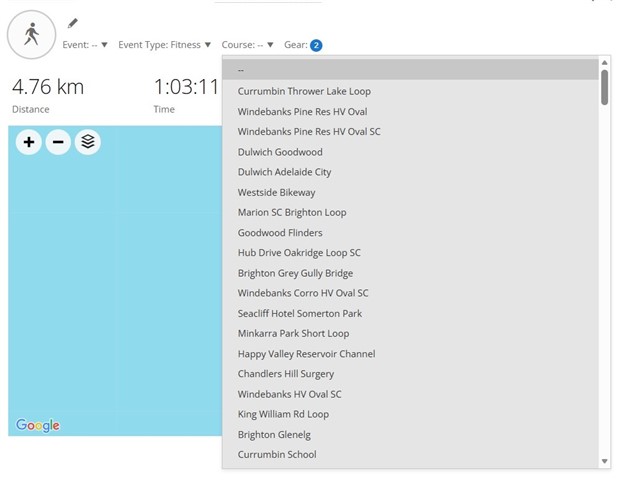
Course drop-down list STILL not in alphabetic order

Refer closed item "My drop-down list of saved courses is not in alphabetical order anymore".

Garmin in their wisdom have updated Garmin Connect so that the work around mentioned in the previous post no longer functions.

I am surprised more users are not complaining about this lack of basic functionality (which Garmin removed - by accident I am sure).

Anyone with a large number of courses must sift through them every time they are recording an activity.

Maybe many have moved to other more user-friendly applications. 
  • Hey I've updated the tampermonkey browser script I posted in the other thread, so that it works again. (A recent change to the Connect website broke it.)

    You can auto-update it through tampermonkey.

    For anyone who doesn't already have the script, here it is:  RE: My drop-down list of saved courses is not in alphabetical order anymore.  

  • I am surprised more users are not complaining about this lack of basic functionality (which Garmin removed - by accident I am sure).

    I think:

    - lots of users don't use the Connect website at all

    - most users are used to bugs and limitations in Connect (both the website and the app). That might be one of the reasons why many Garmin-using runners barely use Connect at all, but prefer to use Strava as much as possible.

    (One other reason I've heard is that people feel Connect is too "complicated". I think this speaks to poor UX tbh.)

    - most users don't expect stuff from Garmin to work well. Same goes for most tech companies, but especially Garmin

  • I think I've used that function once - and I'd consider myself to be a heavy user of Connect. 

    I only retain a few Courses (less than 20), so finding a Course would be simple for me. Most times I'll create a Course, run/ride it, then delete it. 

  • I think I've used that function once - and I'd consider myself to be a heavy user of Connect. 

    This is a good point. How many people need to assign a course to an activity *after the fact*, and how often would anyone do it?

    Says a lot that this feature is not even available in the Connect app. The app neither shows you the course you followed (if any) nor allows you to assign a different course to the activity.

  • I think I know the answer but how do you then measure / view performance over a set course?

  • I think I know the answer but how do you then measure / view performance over a set course?

    Courses are for navigation. Use Segments instead for that. You'll get detailed stats of all your performances on given segment.

  • Having a couple of benchmark courses seems sensible and easily used for comparison - assuming that weather and trail conditions are similar. Trying to compare performance improvements over a large number of courses, each of which I might only run once or twice per year, seems of negligible value. 

  • Having a couple of benchmark courses seems sensible and easily used for comparison

    True, but you do not need the feature "Course" for that. If you regularly do some benchmark runs on certain tracks, you usually do not need any navigation for that, since you already know it well. Besides that, Connect does not even offer the possibility to filter the activities by a course, so you cannot easily compare activities done on the same course, without editing the activity name and entering the course ID there (or into the notes). And if you put the track name into the title, then again using the Course feature is not necessary.

    It is much more comfortable and easier to define a Segment on the course (or on a part of it), because then all your runs (or rides) on the same segment will be ranked automatically, and you get three types of leaderboards where you can follow your progress: your own performances, your group performances, and the ranking of all general public. Additionally, you can filter the ranking by age and gender categories.

    So, TBH, the feature for assigning a Course to an activity is currently pretty useless, and not usable for analyzing the evolution of your performances. Unlike Courses, Segments were designed exactly for that.

  • Thanks all for your input.  Since using Garmin Connect, I have always named the activity the same as the course.  This discussion has convinced me that recording the course information serves no actual purpose, so problem solved.

  • This discussion has convinced me that recording the course information serves no actual purpose, so problem solved.

    If you use the navigation feature on your watch to follow a course, the course will be automatically associated with the activity. I think there's some value in that. (Although, again, you can only see this in the Connect website and not the app)

    I don't see the point of associating a course with an activity after the activity is already finished, especially when it's possible to select some random course that has nothing to do with the actual route you took. I guess it makes sense if you know the course you ran, but in that case, you could've also used the navigation feature on your watch (unless your watch doesn't support navigation).

    It would be cool if Connect would show you matching / similar courses to your activity even if you don't use navigation, but unfortunately it doesn't do that.

    So yeah, the courses drop-down in an activity is kind of a strange feature, and I'm not surprised it's not in the Connect app.

    Having said that, if you do use the feature, I can understand why it would be annoying that the list isn't in alphabetical order. Since it can be a long list, it would be even better if it came with a search bar. But I'm not surprised that Garmin wouldn't invest any time in improving this feature.