This discussion has been locked.
You can no longer post new replies to this discussion. If you have a question you can start a new discussion

Incorrect time on Garmin Connect Windows (web client)

Hello, the Garmin Connect Windows web client is displaying the wrong time; it's showing summer time in Germany. The time on my PC and watch is correct. Do I need to manually adjust for summer/winter time? The language in the web client is (correctly) German.

  • Yes, I know that. However, I always have to manually switch from summer time to winter time.

  • Strange, it works fine for me. I am also in the CET time zone. Where exactly do you see the time wrong?

  • ,,, last synchonisation "2:10" reat time "1:10"

  • Does it happen when you sync with Garmin Connect as well when syncing with Garmin Express, or only with one of them?

    However, I always have to manually switch from summer time to winter time.

    Where? There is no such setting, on that page. I have set simply Central European Time, and it works as correctly in winter as in summer (at least I never noticed that it was wrong in summer).

  • ,,, last synchonisation "2:10" reat time "1:10"

    Based on a quick test, the last sync time on the Connect website is based on the time zone of the device running the browser (i.e. your computer, tablet or phone), not the upload time zone in Connect preferences (which seems to affect newly synced activities).

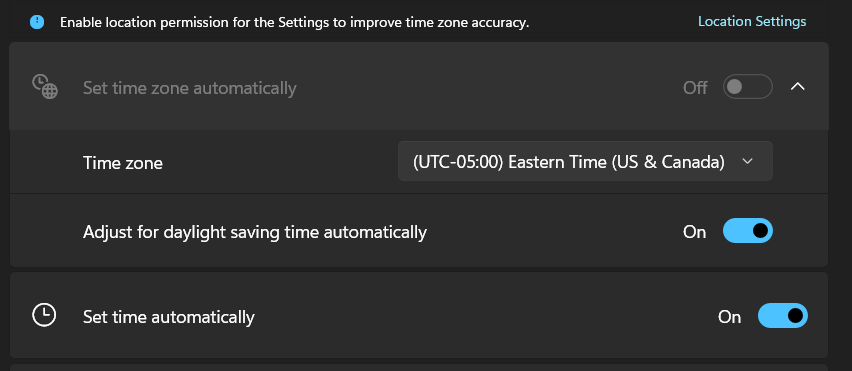
    Is the time zone set properly on your Windows PC? It's possible for the time on your computer to look right, if both the time zone and the time are set incorrectly (especially if you set the time manually). Best thing to do is to select the correct time zone manually (if it's not set automatically), and allow the PC to automatically set the time from the internet. The "adjust for daylight saving time automatically" option should also be enabled.