This discussion has been locked.
You can no longer post new replies to this discussion. If you have a question you can start a new discussion

Heart rate zones in Garmin Connect Web

Hi all, I am trying to understand how the below values are being calculated. 
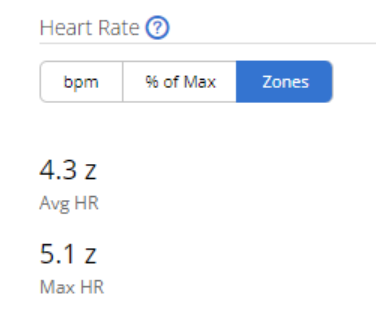
Just to make an example, have for today's run the following "time at zones" values:

Z5 0% 

Z4 26%

Z3 30%

Z2 32%

Z1 9%

And in this case, in the HR zones I can see 3,3 z ave HR, 4,9 z max HR. How these values are calculated?  

Thanks!

  • The formula is clear to me, thanks. I have been checking that in the .tif file there are not fractional values for BPM (unless I didn't see well) so from a math standpoint we could replace zone_(x+1)_min with zone_x_max in my opinion, but if Garmin consider that boundary BPM belongs to zone_(x+1)_min, that's fine to me. 

  • if Garmin consider that boundary BPM belongs to zone_(x+1)_min, that's fine to me. 

    Yes, I think it does, although Garmin isn't clear about it.

    My reasoning:

    - By the HR fractional zone formula I guessed, any HR value on a shared border (e.g. Z1 max and Z2 min, assuming those are the same value in BPM) should belong to the higher zone. It's possible that a different formula could assign such a value to the lower zone, but I really don't see how that formula would be simpler or more intuitive than what I guessed

    e.g.

    - if Z1 min = 123 and Z1 max = Z2 min = 137, then:

    Assuming 137 is in Z1, the corresponding fractional HR is 1.0 + (137 - 123) / (137 - 123) = 2.0

    Assuming 137 is in Z2, the corresponding fractional HR is 2.0 + (137 - 137) / (??? - 137) = 2.0

    Either way, the fractional zone for 137 is 2.0, which means that 137 is actually in Zone 2 (even if we assumed it was in Z1 haha).

    - My zones in FIT file (and from CIQ API getHeartRateZones() call) are: 123, 137, 152, 166, 181, 195

    - The CIQ API getHeartRateZones() call is documented to return Z1 min, Z1 max, Z2 max, Z3 max, Z4 max, Z5 max

    - My zones in Connect's time in zones chart are:
    Z1: 123 - 136
    Z2: 137 - 151
    Z3: 152 - 165
    Z4: 166 - 180
    Z5: 181 - 195

    Therefore what Garmin internally calls Z1 max (which is implicitly shared with Z2 min, internally) is shown to the end user as Z2 min only. The end user sees Z1 max (UI) as [Z2 min (internal) or Z1 max (internal)] minus 1.

    I do think the zones are continuous internally, and I do think that a value on the border of 2 zones is taken to be in the higher zone. I don't think the end user necessarily needs to know or care about this, which is why the bpm zones are shown as non-continuous. (Although I will again point out that the older Connect HR zone settings showed each adjacent zone as sharing a border value. I can see why they stopped doing this - it must have been very confusing for end users)

    Also, for the purpose of something like time in zones, Garmin does have to pick one zone or another (not both) when calculating time in zones.

    I also think that the way the settings show % zones as continuous / sharing a value at the border of zones proves my point about the BPM zones being continuous internally (and continuous in the old settings for old watches).

    i.e.
    Z1: 50% - 60%
    Z2: 60% - 70%
    ... 

    There's no way Garmin could instead show/let you configure:
    Z1: 50% - 60%
    Z2: 61% - 70%

    Because then your BPM zones would really be messed up, like this:

    Z1: 123 - 136
    Z2: 138 - 151

    But in the end all this talk of continuous/overlapping/touching zones vs non-touching zones is really secondary to the question of what fractional zones mean.

    As long as we know that 4.5 z  means roughly 50% into zone 4, I don't think the other details matter. After all, 4.5 z (for example) is probably rounded to the nearest 1 decimal place, the exact fraction isn't important, and if you want the "exact" numbers, you can look at the BPM values anyway.

    Honestly I rarely look at the fractional zone numbers in Connect anyway, although the graphical HR zone charts on the watch itself use a very similar concept (except instead of showing something like "3.5", it would show a needle that is halfway between the zone 3 and zone 4, or right in the middle of the zone 3 bar).

  • Well, what to add? We have deeply analyzed the topic, I learned a lot of new things and I thank you.

    Let's go for the next topic then! .-)