Nutrition counting active calories twice

I can finally track calories and macros in Garmin. This has been on my wishlist for a long time and the potential is huge.

However, there seems to be a problem with how automatic calorie goal and activity level work together.

When setting up nutrition, I enabled automatic calorie goal so my calorie target adjusts based on my actual activity each day. On rest days I should eat less, and on active days I should eat more. This is exactly why nutrition tracking in Garmin is so useful.

After that, I was asked to choose an activity level. The lowest option is “Sitting still”, which already assumes around 4,000 steps per day and basic daily movement.

If I choose this option and actually walk 4,000 steps in a day:

  • The activity level already assumes 4,000 steps

  • The automatic calorie goal then also counts my actual 4,000 steps

So Garmin ends up calculating my calories as if I walked 8,000 steps, which is incorrect.

Suggestion:
If automatic calorie goal is enabled, activity level should be disabled or ignored, since the watch already measures real activity and calorie burn.

  • I agree and this is bothering me as well. Currently if you enable automatic goal then you're basically double counting burned calories.

  • Agree…to get around the double counting issue I did what some others posted, under nutrition settings, set activity level to sedentary or custom activity calories to 1, it does not have a 0 option.  I set it to sedentary to get the zero Value.  That stopped the double counting I was seeing and now shows a calorie deficit to match my weightloss goal under nutrition settings.  It still adds my activity calories throughout the day increasing my adjusted calorie goal.  Works for me until Garmin offers a better solution.

  • Even if you set it to sedentary it's not zero value. Sedentary assumes 4000 steps. And those 4000 steps will be double counted. Even if you set custom activity calorie to 1 it assumes sedentary + 1 calorie.

    Example:
    Your base need for staying alive (keeping organs working and breathing): 1500
    Your need a lazy day (a.k.a sedentiary): 2000

    If you set custom activity calories to 1, garmin will assume you need 2001 calories. Should be 1501.

  • If it is adding calories for 4000 steps in advance than I agree with you but I do not see that in mine.  It is showing only my 4 week average resting calories as my initial target then adding to that any activities throughout the day.  In my case it is deducting around 248 calories from my resting in beginning due to weightloss goal I have configured.

    Maybe I am misunderstanding what this is doing, the fact that we have to try and figure it out tells me the user experience/software is lacking.

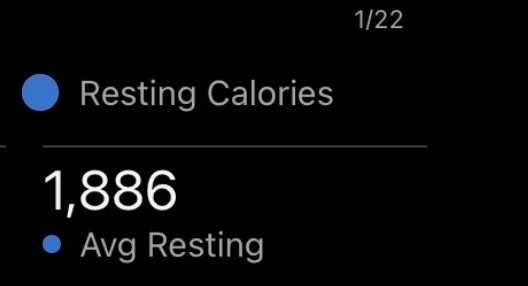
    4 week avg resting

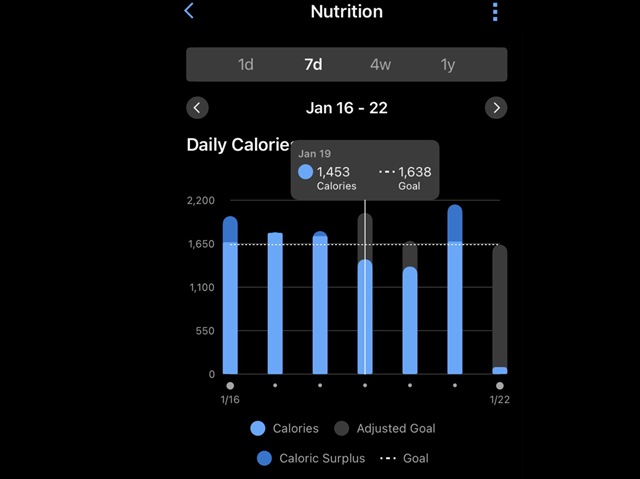
    Nutrition module deducts weightloss from that resting avg defining my goal at 1638. As seen below, 1638 gets adjusted based on my calories burned throughout the day.

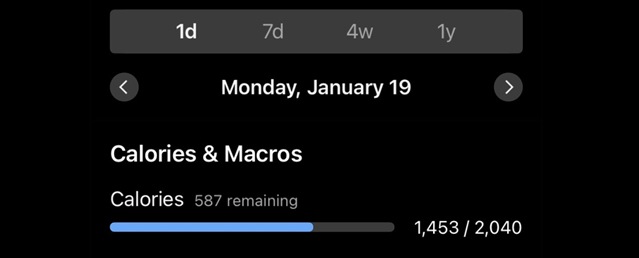
    The adjusted total does not show when you hover over it which is poor programming imo but can be seen under single day.

    Showing the 19th, which was a workout day.

  • I think I see what you are saying, my Garmin resting calories of 1886 avg under calories burned includes avg calories moving around day to day with no workouts?  I agree I see it adding those same calories again as I go about my day to day.  I was wrong on what that resting number meant…thank you for pointing that out, that helps.  Now I’m not as happy about this nutrition feature.

  • Correct. Same here. Is this really worth paying for?

  • Not for me unless Nutrition is fixed quickly.  I am hoping Nutrition improves but as of date, the AI and Performance Dashboard have not improved imo so I don’t have confidence.  I keep leaving feedback on app when asked about connect+, no idea if it is even looked at.