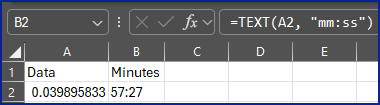
in the activity download, the times are are displayed in a strange structure. like this, how can I get the total minutes per activity?
Row Labels2025-08-05 8:322025-08-12 10:002025-08-13 12:372025-08-15 16:312025-08-16 9:202025-08-18 12:042025-08-19 16:312025-08-20 12:012025-08-21 9:592025-08-22 9:532025-08-23 9:14
| Treadmill Running | 0.039895833 | 0.025787037 | 0.017893519 | 0.019733796 | 0.018634259 | 0.032453704 | 0.009849537 | 0.022407407 | 0.041122685 | 0.02337963 | 0.012546296 | 0.020694444 |