Garmin Upload - why does it not work?

I am trying to upload fitbit data in garmin, but it just doesn't work. This is now the format I am uploading, and I don't get an error message, but the data is not in my account.
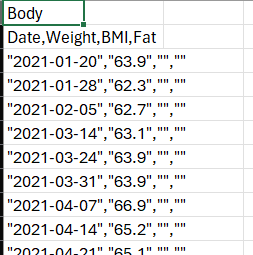
I also tried it without those last two columns, and without the "", but nothing seem to work.

  • but the data is not in my account.

    Did you really look at the right dates in year 2021? Did you select the same date and number formats, when importing the file? Which editor did you use for creating or modifying the CSV file? Avoid rich text editors like Wordpad, Word, or even worse Excel. Only use Notepad or similar plain text editor.

  • Is it normal for Garmin to report a successful upload but not actually present the data in the app or website? I uploaded 56 body weight files which were finally accepted and reported as successful, but 24hrs later its still not showing any data points other than the 5 i've made since purchasing my first garmin watch. The data I uploaded went back to 2019. 

  • Is it normal for Garmin to report a successful upload but not actually present the data in the app or website?

    I did not see it yet. However, in some cases, for example when you choose a wrong date format, the data may finish in another year or a different month than you expect. Also, you cannot import more than a single data entry per day. If you post a short sample file you used, we can test it and probably tell you what is wrong with it.

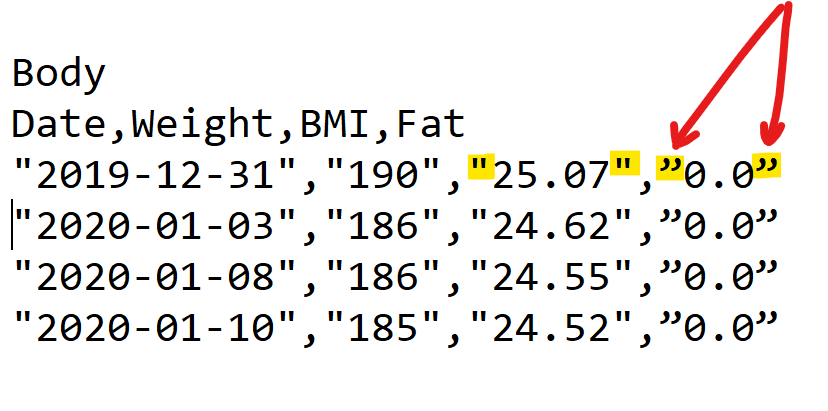
  • Below is an example of the first few lines of my imported file.

    Body
    Date,Weight,BMI,Fat
    "2019-12-31","190","25.07",”0.0”
    "2020-01-03","186","24.62",”0.0”
    "2020-01-08","186","24.55",”0.0”
    "2020-01-10","185","24.52",”0.0”
    "2020-01-15","183","24.45",”0.0”
    "2020-01-16","184","24.29",”0.0”
    "2020-01-18","183","24.24",”0.0”
    "2020-01-23","183.50","24.22","21.60"
    "2020-01-24","183.30","24.19","21.60"
    "2020-01-31","182.70","24.11","21.60"
    "2020-02-01","182.10","24.03","21.60"
    "2020-02-05","181.70","23.98","21.60"
    "2020-02-07","180.50","23.82","21.60"
    "2020-02-11","180.00","23.75","21.60"
    "2020-02-12","179.00","23.62","21.60"
    "2020-03-04","178.30","23.53","21.60"
    "2020-04-10","173.80","22.94","21.60"
  • The problem is in the different quotes you use for some odd reason at the Fat percentage values. They are not the same as at the other values. In fact, as long as the values contain no commas (as in your case), you do not need to use the quotes at all. So either remove the quotes, or use everywhere the same standard ASCII double-quotes (no UTF8 weird alternatives).