Heart Zones on Forerunner 970 COMPLETE Workflow FAIL

I had some good times with my Forerunner 945... 


When I came back from Performance Diag, I could perfectly enter my zones in the Garmin Connect website as well as in the app. And all devices were synchronized correctly.

THIS IS NOT POSSIBLE with my new Forerunner 970 anymore which I bought for ~800€ 

1. I cannot enter any rates on the website anymore.
2. when I climb into the app, I can adjust zones, but only with percentages. No real values. Do you really want the users begin calculating the percentages after looking on their performance sheet?
3. Even after you do calculating - the changed zones are not propagated to the website data records. When you then create a "training" - the zones are arbitrarily different.

THIS IS A COMPLETE FAIL - and I want to run with my 945 again.

You messed up my zones completely ruining my trainings (in a way).

FAIL - please work on that!


Top Replies

All Replies

  • 1 and 2: unfortunately, Garmin watches have been like this for about 4 years (definitely for FR945LTE, FR955, and FR965, as well as your new FR970). I doubt they're gonna reverse course.

    3: people have def complained about this before. I have seen this issue in the past, but I found that it's a cosmetic problem only. The target zone number itself (not the range) is stored in the programmed workout, and when you sync the workout to your device, the range corresponding to the zone number is displayed and used correctly. Someone said that setting both "general" HR zones and sport-specific HR zones in the Connect app seemed to fix the problem for them. 

  • Hi - yeah - thanks for answering.

    I'd really appreciate if some developer entered the discussion in order to provide plausible reasons for that.

    Fact is, I'm not a professional runner but I have my zones fixed and do performance diags regularily. What I come across now - is doing my sunday long runs and permanently hear : "your heartrate is too high", followed by "your heartrate is in the proper zone" - about 200 times. 

    If a watch tells you all the time that you fail even though you're doing great - it will fall back on Garmin's rep.

    As I am a developer myself - I wonder how they justify the change of workflow.

    However, I can reflect that my post is somehow frustration related.

  • I'd really appreciate if some developer entered the discussion in order to provide plausible reasons for that.

    I don't think that will happen tbh. Garmin rarely replies here, and you never hear directly from the devs, nor does Garmin ever try to "justify" any of the decisions they make here. When Garmin does reply to this kind of post, typically it's just to say "that's the way it is" (in different words ofc).

    For 1, it seems to me that when Garmin added the "real time settings" feature to watches (the ability to change all the device settings in the app, including HR/power zones), they also removed the ability to set zones from the website. Could they have preserved that capability in the website? Maybe, but for whatever reason, they chose to remove it. (Maybe because settings via the website can't be "real-time" in the same way as settings via the app, as the app communicates with the directly watch via bluetooth, but the website is not in direct contact with the watch - it relies on the fact that you will sync with the watch "out of band".)

    For 2, I'm not 100% sure, but I *think* it's because the zone percentages are fixed. Meaning that if your zones are based on % Max HR (for example), and your max HR changes, then the zone percentages will remain unchanged, but absolute zone values (in BPM) will change accordingly. If that's actually how it works, it makes sense that Garmin would only allow you to enter percentages, although I recognize this is annoying.

    Fact is, I'm not a professional runner but I have my zones fixed and do performance diags regularily. What I come across now - is doing my sunday long runs and permanently hear : "your heartrate is too high", followed by "your heartrate is in the proper zone" - about 200 times. 

    Are you saying that the watch isn't correctly following the zones you've set when it comes to alerts? If that's the case, I would say it's a bug  (or at least an issue) and you should contact support. But I would def check the sport-specific zones in your watch first. 


    However, I can reflect that my post is somehow frustration related.

    That's ok, I wasn't explicitly or implicitly criticizing any part of your post, only trying to answer as best as I can. I'm just another runner and Garmin user, so I don't really have any kind of pro-Garmin agenda here. Like I'm not here to defend Garmin or anything like that. If anything, sometimes I get attacked in these forums for criticizing Garmin.

    Also, Garmin will always make changes that piss some users off - it's pretty much guaranteed. Sometimes they make a change intended to make one set of users happy, but it ends up annoying users who liked it the way it was.

    See: instant vs step pace on the data page / pace alerts for structured workouts. Garmin used to use instant pace, but some people wanted step pace, so they changed it. But now people who liked instant pace are mad.

  • I have no idea why Garmin removed the BPM (absolute) basis of HR Zones from some of their models, but they did keep it on others. For example Instinct 3 still does have it.

    However, I would not bother too much about HR Zones in Garmin Connect or on the watches - they are not used in any way for the internal calculation of various metrics, they serve exclusively as a visual aid for the user. In contrary, unlike the HR Zones, it is very important to have the correct Max HR, LTHR, and Resting HR values in the settings.

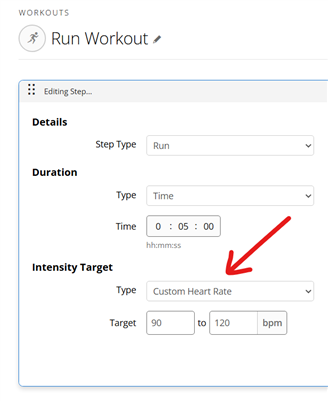
    So if you know your workout should be done in certain HR range, simply create a workout with that HR Target range:

    Alternatively, you can set the Low and/or High HR alarms in absolute HR bpm, instead of using HR Zone alarms, in the respective activity profile. 

  • Great idea! Even if it’s a bit fiddly, I’d still prefer it that way and run in silence Smile