Intensity minutes in app and web shows wrong data

Hello, since some weeks the intensity minutes displayed in app and web are totally off.

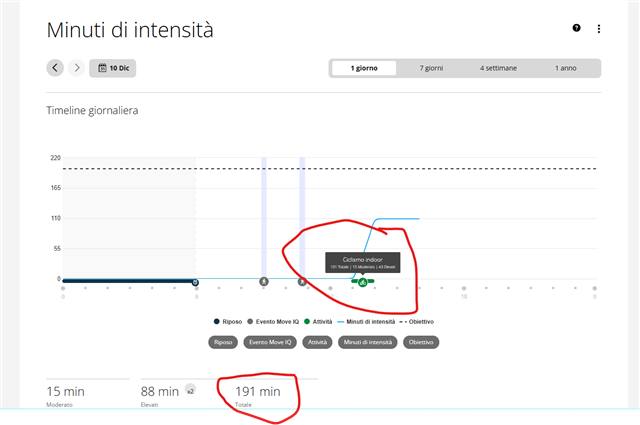
The activity i made today just collected 101 total minutes but the total in the section is 191 (impossible as I didn't do anything else).

The funny part is that the graph show the correct value while the day total is off.

Anyone has the same issue?

Thanks
 

  • Besides the issues with minutes and load, I have seen an increase in calories also.On the plus side, my Fitness Age has dropped 2 year this month!!

  • Okay, I found a temporary solution that won't work for everyone, but maybe it can give you some ideas: The explanation being long, I write below the ultra-simplified version, then after the detailed version for someone who, like me, uses their equipment with a home trainer (zift ride).

    In short, when the watch is paired with the heart rate monitor and phone simultaneously, it doubles all activity data. Therefore, it randomly displays doubled intensity minutes and sometimes even calories burned (this problem appeared for no apparent reason). WARNING: Due to their bug, all your data is likely completely inaccurate now; check it ALL! The idea is to avoid connecting the heart rate monitor to both the phone and the watch at the same time to prevent this problem. Connect only to the phone.

    *

    Detailed explanation:
    Remove your HRM from EVERYTHING it's connected to (Garmin Connect, Bluetooth watch, etc.). Turn off your watch, delete Garmin Connect, and turn off your phone.

    Start the watch and reinstall Garmin Connect. Connect the watch to the Garmin Connect app, then check ALL your data (weight, minimum and maximum heart rate at rest, during running, and during cycling; also check your FTP, which has probably doubled; your VO2 Max is probably incorrect—there's nothing you can do about it, sorry...). Check on both the watch AND the app.

    Remove all Garmin-related features (for example, Garmin calculating your maximum and minimum heart rate, FTP automatically calculating heart rate, etc.) (enter your actual values). Verify that your heart rate zones are correct; if in doubt, reset them. Do not let Garmin perform its calculations (which are inaccurate); set them to "per heart rate zone".

    Pair your HRM with your home trainer/Zwift, then pair your watch with the HRM, BUT DO NOT pair it with Garmin Connect. Turn off both the watch and the home trainer. Restart and verify that your personal data hasn't changed and that your FTP is correct. Start your activity as usual, making sure to activate both the home trainer and the HRM via your watch. When you're finished, everything should be fine. (Remember, a few minutes of intensity will be displayed outside of your activity (2-3 minutes max). This is normal; it's the time it takes for your heart rate to return to acceptable levels.)

    There you go, the intensity minutes are no longer doubled, and the calorie count is correct (you can verify this on your watch by clicking on "calories"). Before, when it wasn't working, for one activity, we would get "300 calories and an additional 320 calories" (this is just an example). This will no longer be the case.

    **

  • The problems with this method are as follows: because of their bug, our stats are messed up for December (FTP, watts, VO2 max, sometimes heart rate, etc.), but it will take a long time (several months) for the stats to be reliable again.

    Another issue is, in the case of someone using their HRM WITHOUT the watch... well, there's no other choice but to install it on Garmin Connect, so I suppose the strategy doesn't work in that case, because as soon as you have the watch + the HRM, everything will start doubling again.

    So there you have it, sorry the explanation is long, I hope it's clear enough. And above all, I hope that one day Garmin will get moving and find a REAL solution. (The current real solution is not to have a Garmin chest strap... (or not to have one at all) - ironic!).

    Edit: I forgot to mention, remember to remove Move IQ !

  • our stats are messed up for December (FTP, watts, VO2 max, sometimes heart rate, etc.)

    I do not see how VO₂max, power, FTP or even HR could be messed up with double counting of Intensity Minutes.

    The current real solution is not to have a Garmin chest strap... (or not to have one at all)

    I am sorry, but that's also an overreaction. I do use HRM-Pro or HRM 600 daily, and all works as expected. Try simply removing the HRM from Garmin Connect in the time being before Garmin fixes the bug.

  • Quite simply, (and you can check, many of us have this problem in reaction to the double intensity minute). Simply because in their algorithm, when you do twice as much, you're better than when you do less. (Apparently, doing it twice "at the same time" for the application means, for example, doing 250 watts x2). VO2 max and FTP are affected, among other things. And of course, my message is addressed to those who currently have a problem. As for your "solution" of not using it, I've already detailed all of that in my long message (which wasn't addressed to you because you obviously don't have a problem, good for you).

  • No, it does not work like that. VO₂max, FTP, Power, etc are completely unrelated to Intensity Minutes, and do not even remotely share any part of algorithm, or do not rely on IM. There is no way the double counting of Intensity Minutes could influence that metrics.

    As for your "solution" of not using it,

    That was your "solution", not mine. You recommended to avoid using a chest belt entirely. I advised that you should just unpair the HRM from Garmin Connect (while keeping it paired with your watch), and continue using it normally.

  • It's because you didn't understand: let me explain again.
    The intensity minutes aren't the cause, but a consequence of their bug. Because, as I said, if you do TWICE the normal activity you do in 30 minutes (and therefore have the capacity to do 60 minutes in 30 minutes, which is the principle behind this algorithm bug), it skews your data, and that's what happened. No need to reply, I've already taken the time to explain as best I can for those who are interested and have the problem. I don't have much time to waste on pointless debates. If you don't have the problem and everything is working perfectly for you, then don't waste your time on this. PS: And if, as I said, and until proven otherwise (because we don't know if it will ever be fixed), the current solution is not to use/not to have (it amounts to the same thing) a Garmin HRM, or to have one from another brand so that it doesn't crash everything. Because, as I wrote, depending on the activity you're doing, having a Garmin HRM isn't currently usable (for example, if you do boxing and you can't keep your watch on, it forces you to use the HRM and therefore to register it on the Garmin Connect application to start the activity, and so, the next time you use your watch AND your HRM you will have everything duplicated again, and therefore you will have to delete it from all the places where it is registered etc). Anyway, I've already explained everything. I'll stop there; this message was to help those who have problems, not to have someone say incorrect things and waste my time. So there's no need to reply to me, I won't reply.

  • I understand very well that some users get the Intensity Minutes double counted. However it cannot influence the metrics like VO₂max or FTP in any way, because at these values, it does not matter how many minutes you needed to reach the FTP or VO₂max levels. As I wrote, the algorithms are completely independent.

    Because, as I wrote, depending on the activity you're doing, having a Garmin HRM isn't currently usable

    You do not need to pair your HRM strap to the app for that. All you need to do is starting the activity on your watch, leaving it in the bag, and after the workout stopping the activity, and downloading the HR data from HRM directly to the watch (if it does not happen automatically, which it normally does). You do not need the Connect app for that at all.

  • You do not need to pair your HRM strap to the app for that. All you need to do is starting the activity on your watch, leaving it in the bag, and after the workout stopping the activity, and downloading the HR data from HRM directly to the watch (if it does not happen automatically, which it normally does). You do not need the Connect app for that at all.

    This is correct.

    To elaborate on this:

    - HRM-PRO (and newer) straps only need to be paired with Connect if you want to:

    - track "all-day" activity tracking metrics such as steps, intensity minutes, and heart rate while not wearing the watch and not recording a timed activity

    - track steps during a timed activity while not wearing the watch

    - start an activity without using the watch at all (for the newest straps like HRM-600)

    - If you wear an HRM-PRO (or newer strap) while recording a timed activity on your watch but the watch is off your wrist:

    - as long as the strap mostly stays within range of the watch (and assuming the strap has been paired with the watch as it normally would be), then HR data will be tracked during the activity as it normally would be. In this case, you don't need to download HR data from the chest strap when saving the activity (and in fact you shouldn't, as in my experience, this can actually corrupt your activity HR data)

    - if the strap is mostly out of range / out of contact with the watch (e.g. during swimming), then you can and should download HR afterwards

    Based on what everyone is saying here and on other similar threads, it seems likely that intensity minutes are indeed being (roughly) double counted, possibly due to a malfunction of the feature where Garmin chest straps (HRM-PRO and newer) can track intensity minutes while the user is not wearing the watch. It's possible that the nature of the malfunction is that intensity minutes from these straps are incorrectly being counted while the user is wearing the watch, which would lead to "double-counting" (roughly speaking) of intensity minutes.

    If this is actually the case, then trux's suggestion to unpair the Garmin chest strap from the Connect app, and otherwise use the chest strap as normal, should hopefully be a viable workaround for the problem. 

    As trux said, in the case of activities where you cannot wear your watch (like boxing), the simple workaround is to start the activity from the watch before putting the watch away, rather than starting it on the strap from Connect. Surely in any circumstance that you're able to start an activity from Connect (on your phone), you should also be able to start the same activity from your watch.

    I can't really think of any real-world scenario (right before some kind of physical activity) where you'd have access to your phone but not your watch, unless you forgot your watch at home or something. 

    For context, I have an HRM-PRO Plus which I use for basketball, and these are the details of how I use it:

    - I do not wear my FR955 watch when I play full-court basketball in a gym

    - I do ensure that the HRM-PRO Plus is paired and connected with the watch before I start the activity

    - I do start a timed basketball activity on my watch before I start playing

    - For most of the activity, my HRM-Pro Plus and I stay within range of the watch (which is stashed on the bench), so I don't need to download HR when the activity is saved (and in fact I *don't* want to do this, as ime it leads to HR corruption)

    - In my case, my HRM-PRO Plus *is* paired with Connect, but the *only* reason I need/want this is for steps to be counted while I play basketball and I am not wearing the watch

    If I was being bothered by the same problem as others in this thread [*], and I wanted to work around it, I would just unpair the HRM-PRO Plus from Connect. Hopefully it would solve the problem, with the downside that steps would no longer be counted during activities where I do not wear the watch but I do wear the strap.

    [*] it's possible that I'm experiencing the exact same problem as every one else, except it doesn't bother me as much since I don't wear the strap for most activities [**], so my intensity minutes are mostly correct. Besides, I care more about my step count than my intensity minute count, although to be fair, neither of those metrics are super important to me, as long as I roughly hit my daily/weekly goals.

    [**] most of my activities are runs, but I only wear a strap for interval workouts, which comprise a minority of my runs

    not to have someone say incorrect things

    Right, incorrect things such as:

    "if you do boxing and you can't keep your watch on, it forces you to use the HRM and therefore to register it on the Garmin Connect application to start the activity"

    You're not forced to do that at all. Like trux said, you can start the activity from your watch and put your watch away before you box. If your HRM is paired to your watch (as it normally would be), and you stay within range of the watch, you don't even need to download HR after the fact or do anything special at all.

    Seems to me you're just fixated on one specific way of recording an activity without wearing the watch, while rejecting the idea that there is another way to do it. It's like you're not even willing to try a different way.

    Yeah, it's kinda cool that the newer straps let you start an activity without your watch, but you are not forced to do it that way. To me it's more of a gimmick than anything else, because like I said, if you have access to your phone before an activity, hopefully you would also have access to your watch in the same situation.