Intensity minutes in app and web shows wrong data

Hello, since some weeks the intensity minutes displayed in app and web are totally off.

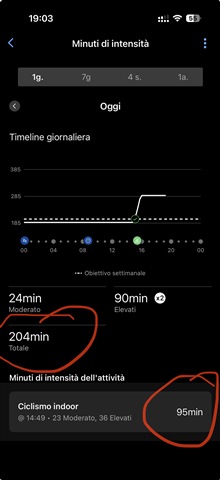
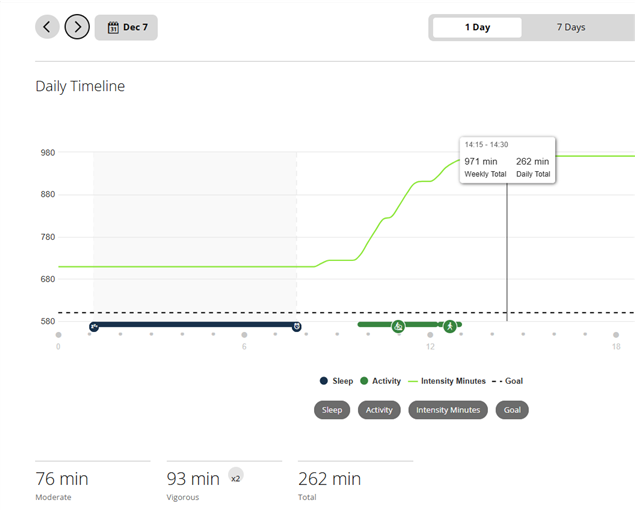
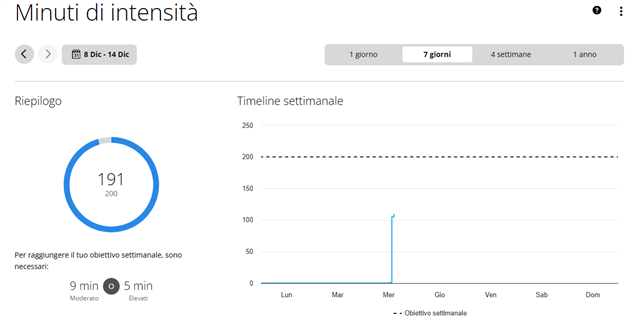
The activity i made today just collected 101 total minutes but the total in the section is 191 (impossible as I didn't do anything else).

The funny part is that the graph show the correct value while the day total is off.

Anyone has the same issue?

Thanks
 

  • I see something similar — more intensity minutes in a day than can be accounted for via timed activities and move iq events. 

    However I don’t think it’s 100% a bug. 

    [https://support.garmin.com/en-CA/?faq=pNU9nnDzzGAHmEavp9rpY8]

    “Intensity minutes are earned based on your current heart rate when compared to your average resting heart rate or the number of steps taken per minute. For example, you can earn intensity minutes once a brisk walk or run is detected”

    So if you briskly walked a lot that day you could’ve earned additional intensity minutes. What I do think might be a bug is the fact that such additional minutes don’t seem to appear on the graph at all. 

    if you want to test my theory you could have a day where you don’t wear your watch, but you leave it turned on. You should have 0 intensity minutes for that day. You could have another day where you don’t do any timed activities but you just briskly walk for 30 minutes. You should get 30 moderate or vigorous minutes that day. I realize that might not be practical tho. 

  • Walking could give you some intensity minutes not 90!

    also I assure you that I was sitting at the desk all day and the only time my heart was in zone 3 and 4 was during the activity displayed. 

    also consider the graph! It gave the correct amount.

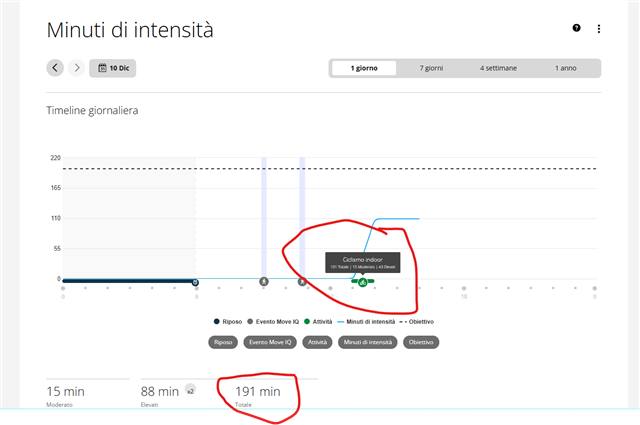
    this happened also in other days (below as example)

  • To me it looks like that in your case the total uder the graph shows the weekly total. In my case, when I am on the "1 Day" graph, the total shows exactly the same value as the graph, although the values on the Y axis graph for today starts at the IM value from yesterday (just like on your second screenshot from the phone app).

    See an example how my IM look like in GC Web:

    This was on Sunday, so the totals at the bottom and the graph equally show the increase of 262 IMs on that day, and the starting value accumulated since Monday is used as the offset of the graph.

    BTW, unless you changed the default setting for IMs, by default you get IMs anytime your HR is certain percentage over your Resting HR, regardless whether you record an activity or not. So it is not at all surprising if you get more IMs during the day, than what the activity shows.

  • I rechecked many past days and weeks in my stats, and I do not see any such discrepancy as in you case, so I suspect it might be caused by something specific to the device(s) you have. Which devices do you use? Do you have multiple of them? For example a watch, a cycling computer, a sleep monitor, and/or a HRM chestbelt? If so, which models exactly?

  • Thanks for the answer but It’s not the case look below the only activity in this week was today

    And as you can see from the graph there is no minutes before today so for my lifestyle gaining 90 minutes only “living” is not possible.

    also I have settled minutes to z3 and z4 hr

    there is definitely something wrong

  • Which Garmin device(s) do you own?

  • I use epix 2 pro and hrm pro plus.

    but it started to do like this only from some days. And I didn’t change anything on my setting or habits

  • Is HRM Pro connected directly to Garmin Connect, or only to the watch? If it is paired with GC, try removing it from there, and observe it in the next days, whether it makes any difference. If not, then post your message on the Epix 2 forum, to see whether other Epix 2 owners expereince the same. I have Instinct 3 + HRM-Pro, and the IM values are always correct.

  • here is the image, before i wasn't able to upload

  • it's connected to both. I will try thanks.