Graphical Reports Export

It would be nice to print out a graphical health (sleep) report or have the ability to print the report on the Garmin Connect page to PDF.  This would make it so much easier to show my doctor rather than a non-visual .csv export.  Maybe there is a way and I haven't found it?  Thanks Jim

  • There is not a way to do this in Connect, so I recommend sending a feature request for consideration using the following link: https://garmin.com/ideas

  • It would be nice to print out a graphical health (sleep) report or have the ability to print the report on the Garmin Connect page to PDF. 

    As you may have noticed, if you do try to print the Connect sleep page or save it as PDF, it doesn't look right, as the sleep chart and other information is missing.

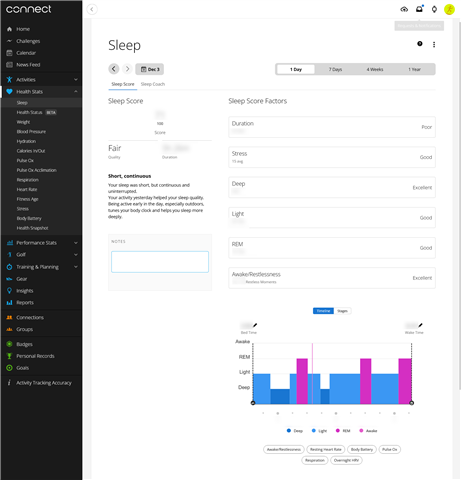
    As a workaround, you can use the screenshot feature in Firefox. In general, this works better than a standard screenshot in Windows or Mac, because it typically captures the entire page even if it's so big that it needs to scroll vertically and/or horizontally. (Unfortunately, in the case of Connect, it seems to only capture what's visible on the screen.)

    1) In Firefox, open the Connect sleep page (or whatever page you want to capture)

    2) Resize the browser window until the shape / layout of the page is suitable for export. (e.g. if you have a widescreen monitor / laptop, as most of us do, you may want to make the window narrower than usual, so you don't end up capturing a lot of useless empty space.) If you are going to show your doctor the exported page on a phone, you may wish to hide the left sidebar and make the window especially narrow, so that you only need to scroll vertically and not horizontally when viewing the export.

    3) Press CTRL-SHIFT-S (Windows) / CMD-SHIFT-S (Mac), or right-click on a blank part of page and select Take Screenshot

    4) Select Save full page

    5) Select Download

    This will save the full page - exactly as it appears in the browser - as a PNG image file. If you really need it as a PDF, there are various online tools that convert PNG to PDF.

    Here's an example from my own Connect account:

    Ofc you will have to take multiple screenshots if you want to show both the timeline and stages, or to select different graphs on the timeline (like body battery or pulse ox).

    But it's a viable way of showing someone else, like your doctor, the exact same thing that you see in your web browser.