Personal Record View with a BUG. Record time calculations incorrect.
Receiving personal records is bugged.
After a while, I checked the Personal Records section on Garmin Connect Web and noticed that not only is it no longer updated with new performances, but when manually entering them, it doesn't take into account the split with the best record for the selected distance.
For example, in a 13K race with a best 10K record, it enters an incorrect time, entering the total time for the 13K distance and recalculating it as if it were based on a 10K distance.
This calculation is absurd, especially when managing a "record over a distance." Recording such a precise distance is only possible with professional courses and equipment and in contexts like the Olympics or championships, while most users achieve a Personal Best within a longer performance.
This is also described in the guide provided by Garmin.
Other reports suggest entering the time value from the Lap Card for the specific activity in the "record" field.
This is also incorrect because the "record" doesn't necessarily include the distance from the first kilometer. This often happens with longer activities or with uphill sections, and generally in races, it's very rare for the first kilometer to be the fastest.
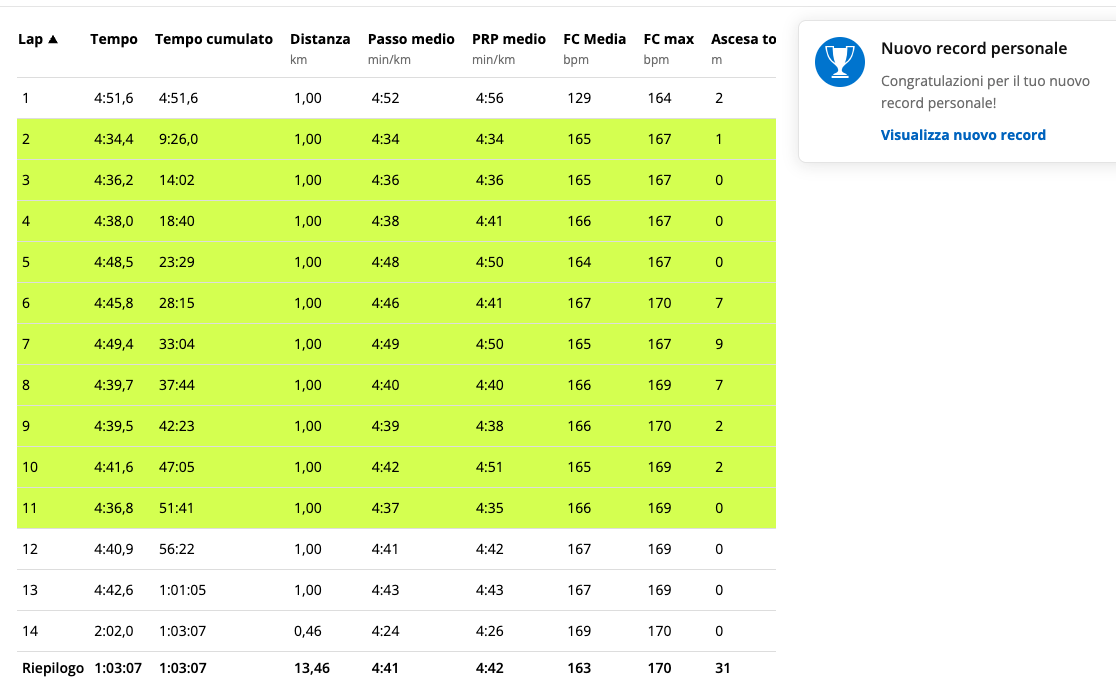
I've attached two screenshots of the incorrect automatic calculation when setting an activity as a Personal Record, and of the Lap Sheet, where you can see that the 10Km Personal Record is between km 2 and km 11.
An alternative that's not very nice to describe is to use Strava to read the exact time of the Personal Record and report the Strava PR data in the Garmin table. Is this what it's supposed to be?
The 12km activity containing the 10km personal record is in yellow, and the incorrect automatic calculation recalculating the total time of the 13km activity over the 10km distance is in red. Even the average pace is recalculated to add further hilarity to an already ridiculous record-breaking time.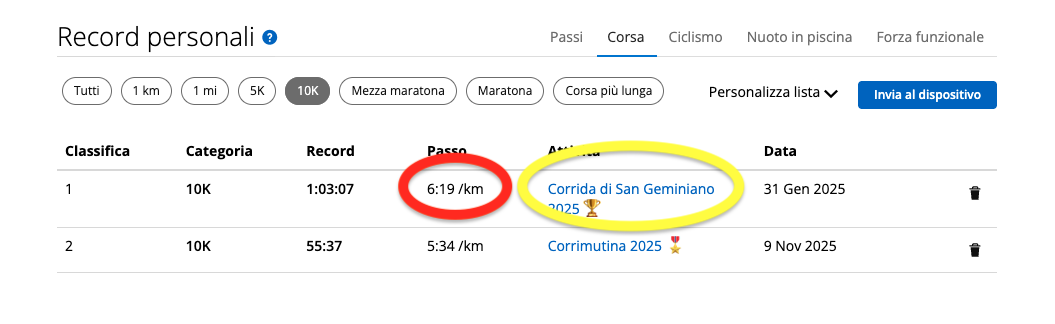
Below is the Lap Sheet of the activity in yellow, where you can clearly see that the "10Km record" interval runs from Km 2 to Km 11. Strava (I'm not attaching the screenshot) calculates it with a time of 46:49 and a pace of 4:41 min/km, which is quite different from Garmin's embarrassing calculation of 1:03:07 with a pace of 6:19 min/km.