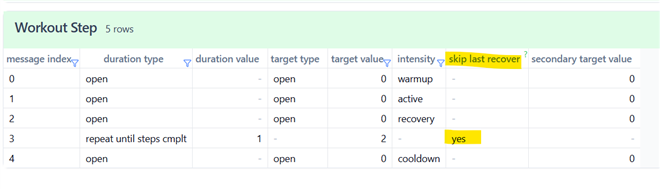
Running workouts: remove last recovery in run repeat

I create workouts from the web interface on my PC.
Until a few months ago, the removal of the last recovery phase in repetitions was optional via a checkbox.
Now the checkbox has disappeared.
In older workouts where I hadn’t enabled it, I go through all the recovery phases, while in newly created workouts, the last recovery phase is automatically removed without giving me the option to choose.
Would it be possible to restore the checkbox?

  • Hmm that's strange, I still see the checkbox in both the Connect website and the Connect iOS app. I have a Forerunner 955. Do you have a newer watch (like FR970 or Fenix 8) by any chance? I wonder if Garmin has removed this checkbox only for newer devices (but preserved the behaviour where it's enabled).

    Dumb Q but do you actually have a rest or recovery step inside of the repeat where you expect to see the checkbox? I'm sure you do, but just double-checking. I did find that if you remove the rest/recovery step from a repeat, the checkbox disappears.

    Can you try using the app?

    If you still don't see the checkbox, I can think of 2 potential solutions:

    - I could create a script to modify the Connect website to restore the "skip last repeat/recovery" checkbox for workouts. I'm kind of reluctant to do this as it's a bit of work and I created a bunch of scripts recently to add features / fix bugs Connect (in response to forum posts) which apparently nobody is using. But if this is something you think you would actually use, I would give it a shot

    - I could give you the instructions to export, edit, and re-import a workout while changing the "skip last repeat/recovery" setting. I wouldn't mind doing this but it wouldn't be convenient for you

  • I've a new Instinct 3 and an old Instinct.
    Some days ago I received a warning message on Android connect app telling me "insticnt 3 does not support remove last recovery" or something like that.
    Today I've the same behaviour on both devices.

    Creating the workout via Android Connect app I don't see this behviour

  • Some days ago I received a warning message on Android connect app telling me "insticnt 3 does not support remove last recovery" or something like that.

    Hmm it's true that older devices don't support remove last recovery, but what I've seen is that the checkbox is still displayed but you get a warning when you try to sync the workout, similar to what you said.

    Maybe the problem is that Garmin erroneously thinks that Instinct 3 doesn't support remove last recovery, like you said.

    Creating the workout via Android Connect app I don't see this behviour

    So, are you saying that it works as expected in the Connect app, but not in the Connect website? As you said "Android connect app" in both cases.

    Either way, if this is a bug you should probably contact Garmin support. But if you do have a way to make it work (by using the app), that's probably the best solution for now.

  • The warning message and working workout were both on Android App. The missing check box (never appeared on Android App) is in the PC/web app.

    I guess the Garmin web developers made some mess

  • I've got an open support call about this.  It was working on both Web and App with my Epix Pro gen 2 until last week.

    My guess is that the last update to my watch borked the feature.  We'll see!

  • I use a Forerunner 165 and this feature always used to work for me with the checkbox. Even though it gave me the warning that the watch doesn't support this feature, it would still skip the last recovery when I checked the box.

    Now this checkbox is gone.

    Some of my old custom workouts have the last recovery as skipped, but it doesn't say this (on both PC and Android App), so I don't know if it is on or off.

    It is very strange and it appears that they have purposefully disabled this feature for older watches. 

    Any workarounds would be appreciated!

    ( I would be happy to export, modify and reimport, if you are able to show me how to do this!)

    Thanks 

  • I just tested it with my Instinct 3 - I created a workout with a 2-times repeat. There was no option to skip the last recovery, but when I executed the workout, the last recovery was skipped anyway. So it looks like the skipping of the last recovery is now implicit, and there is no option to keep it. Which makes sense. Finally, if you need a recovery there, you can always add it.

  • ( I would be happy to export, modify and reimport, if you are able to show me how to do this!)

    Alright this procedure requires a computer (PC or Mac) and Chrome. It is a little technical (you will need to edit JSON files).

    1) Install VS Code on your computer: https://code.visualstudio.com/ 

    2) Install json formatter for VS Code: https://marketplace.visualstudio.com/items?itemName=ClemensPeters.format-json 

    3) Open Chrome

    In Chrome:

    4) Install the Share your Garmin Connect workout Chrome extension:

    https://chromewebstore.google.com/detail/share-your-garmin-connect/kdpolhnlnkengkmfncjdbfdehglepmff 

    5) Open https://connect.garmin.com and sign in 

    6) Navigate to the workout of interest

    7) The extension from 4) should have added a Download button to the right of the Send to Device button in the upper-right hand corner. If you don't see it, try horizontally resizing the browser window. Once the button appears, you can change the size back

    8) Press the Download button. This will download the workout as a JSON file: [workout name].json

    9) Open the json file from 8) in VS Code

    In VS Code:

    10) Open the command palette (CTRL-SHIFT-P / CMD-SHIFT-P) and select "Format JSON"

    11) Search for "skipLastRestStep" (CTRL-F / CMD-F)

    For every set where this option is applicable (i.e. sets which have recovery or rest), you should see one of the following lines of text:

    "skipLastRestStep": true

    or

    "skipLastRestStep": false

    Change the value of skipLastRestStep to true or false as necessary.

    12) Save the edited JSON file

    In Chrome:

    13) Navigate to the Connect workout list or click this link: https://connect.garmin.com/app/workouts 

    14) The extension from 4) should have added an "Import Workout" button at the top, next to the Create Workout button. Click Import Workout and select the edited JSON file.

  • So it looks like the skipping of the last recovery is now implicit, and there is no option to keep it. Which makes sense.

    I don't necessarily agree that all of that makes sense.

    On the contrary, I would suggest that making this behaviour implicit is not user-friendly at all, as evidenced by multiple threads asking why Garmin Coach / daily suggested workouts skip the last recovery (in this case, skipping the last recovery has been implicit for a while), by users who assume this is a bug. It doesn't help that when you view a workout on the device itself (on watches at least), there is no indication at all that the last recovery will be skipped.

    At the very least, if and when skipping the last recovery is applied (whether mandatory or optional), Garmin should make it explicit both in Connect and on the device itself.

    I would agree that having this behaviour as a *default* would make sense, but clearly hiding it from the user has not worked so well.

    Ofc Garmin can always count on free tech support from the community in these forums, reddit, etc, so ig they don't have to worry about usability at all.

    it looks like the skipping of the last recovery is now implicit

    All I can say is that even if this behaviour is intentional, it has not been applied universally, as I still see the Skip Last Recovery checkbox / text in both the Connect app and website. (I have a Forerunner 955.)

    Perhaps this change has only been made for certain devices.

  • So it looks like the skipping of the last recovery is now implicit, and there is no option to keep it.

    ... and I checked the workout FIT file, and indeed the Skip option is included by default. So if you have a workout where the last recovery is still present, it may be enough to edit it in Garmin Connect (I used the web version), and resend to the device. No complicated editing with external tool is needed for that. Should the edit not work, then recrate the workout again.