This discussion has been locked.
You can no longer post new replies to this discussion. If you have a question you can start a new discussion

One of your files was not accepted by the system. Please contact Support for assistance.

I am using a Forerunner 35.

This morning I ran just over 21km. My longest run in over a year, but not by much (I've done a few 15-16km runs), though there shouldn't be a memory issue on the watch.

The run wouldn't sync to Garmin Connect on my phone like it normally does.

Tried connecting to my laptop and importing via the web, but kept receiving the "One of your files was not accepted by the system. Please contact Support for assistance." message.

Then tried uploading and the FIT file to fitfiletools.com and using the Section Remover tool, as advised on these forums to people with similar issues.

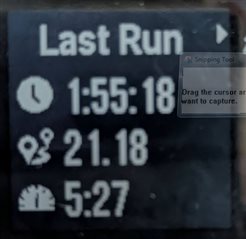
I can see on the map that approximately the last 4km is missing from the run (it should start and finish at the same location, the saved activity on my watch is 1:55:18 & 21.18 km).

Saving the new FIT file and trying to upload that via the web still gives me the same error message.

Have attached the original zipped FIT file. Hoping someone will be able to help?

Thank you.[solved]
  • This will work - [solved]

    Fixed using Fit File Repair Tool.

  • Thank you so much, such a swift response! Thumbsup tone2

  • Hi is threre anyweay you can fix mine? I ran in the cold, it had full battery and died 1km before i finsihed.  I thought garmin saves it before dying.  I went down a rabbit hoile until 1 am  of trying to extract this damn file - (I have a stupd Mac which does not line garmin or MTP) -I tried open mtp and that didn'[t work, finally tried android to mac and this allowed me to extract the file in question.... but I cannot up load it.  I get an error that is not accepted and to contact customer support.  I'm on hold with her now...I don't think she is competent :(  are there apps for  mac that coud correct the file?

  • Most activity issues can be fixed with FIT File Viewer.

    If you’re still having trouble uploading the repaired file, attach the original file to this thread so we can see if it’s fixable.

    • Zip the file, then in your reply go to Insert >> Image/video/file >> Upload >> browse for the file >> OK.
    • Or, you can upload the FIT file to a trusted file-sharing service like OneDrive, Google Drive, or Dropbox, set it to public, and share the link in your post.