This discussion has been locked.
You can no longer post new replies to this discussion. If you have a question you can start a new discussion

How can I get correct heartrate zones for Zwift activities

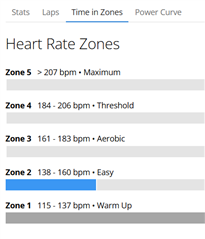
I'm importing rides from Zwift to Garmin Connect for my indoor rides but my hearrtrate zones are completely incorrect.

I see talk of using secondary zones but I cannot for the life of me find where to set these

I find other questions around this but no answers.

How can I these activities to show something remotely close to my max of 172bpm.
  • What Garmin device/watch do you have? The setting of HR zones in Connect will depend on your answer.

  • I have a Garmin Epix Pro v2, an Edge 830, and an Index S2 but I don't record Zwift rides with any of these.

  • For anyone else finding this. Yes, the answer makes absolutely no sense to me but it works.

    Answer: Set your zones in your devices - even if you are not using any of these devices to record your Zwift activities.

    Open the Garmin Connect app on your phone. Select one of your Garmin devices in the top right corner.
    On an Epix Pro 2 watch I found the zone settings under User Profile | Heart Rate & Power Zones | Heart Rate
    On an Edge 830 I found the settings under User Settings | Heart Rate Zones

    Hope this helps someone else.