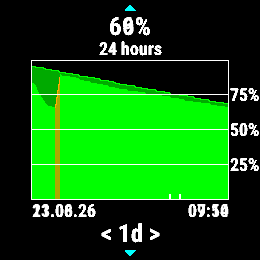
In brief: Complete/verify the update with Garmin Express, reset the watch, and go through the full charging cycle (twice).
That advice works in the vast majority of cases of a sudden high battery drain after a firmware update, that we use to see here on the forum frequently. If it is not your case, if it does not help, or if you need more details, please continue reading:
Possible Reasons of High Battery Drain
- Do this first of all in every case: Incomplete firmware update - firmware updates often come in several parts, and if the updating of some of the parts fails, it may lead to unpredictable behavior of the watch. Connect the watch over the USB cable to a computer with Garmin Express, make more free room on the watch (explained below), open the panel with the concerned watch, click the symbol ⟳, and install any pending updates.
- The battery gauge is decalibrated. Fully charge the watch and leave it plugged in for an hour more, after it shows 100%. Then disconnect, sync, and perform the reset (hold the Light button for up to 30s till the watch shuts down, keep holding the button through the emergency notification if any comes). No worry - no data, and no settings get lost, at the reset (unlike at the master reset to factory defaults)! When powered down, wait ~10s, and restart. Use the watch until it fully discharges and shuts down. This process should recalibrate the battery gauge. In some cases you may need to repeat the full charge and full discharge cycle twice, in order to reestablish the calibration.
- You use excessively power-hungry options such as the PulseOx, GPS, or backlight - verify the settings and disable especially the nightly and all-day PulseOx options
- You use a power hungry Connect IQ app or watchface. Uninstall all CIQ apps, to see whether it helps
- There is an excessive usage of the Bluetooth (or WiFi) connection. That can happen for example when the watch continuously tries to download an update, and it goes on failing each time (i.e. due to low storage, communication problems, etc.). There are many other possible reasons though too (failed sync attempts, syncing huge segments, maps, ...). To confirm or exclude BT as the culprit, disable the BT ('Phone' option in the Controls menu) and WiFi (if available on the model) for a few days, to see whether it makes any difference
- On some models, an older firmware version had a problem with letting the GPS turned on after the end of an outdoor activity, increasing so the power consumption. If updating the firmware to a recent version is not desired or possible, power cycling the watch after each outdoor activity would turn the GPS off. Usually, entering and exiting the GPS screen (typically accessible by long-pressing the GPS button, on most Garmin watches) may help too, without having to reboot the watch.
- Also review the Tips to Extend the Battery Life on a Garmin Fitness Watch | Garmin Customer Support
- There may be a shortcut on the charging contacts, caused by dirt, sweat, or salt deposits - use 70% isopropyl alcohol to clean the contacts. Soft fine toothbrush may help cleaning better the space around the pins. See also Cleaning the Charging Contacts on a Garmin Watch | Garmin Customer Support I also recommend using a protective plug for the contacts. You can find them on Amazon, eBay, Aliexpress etc for a bargain.
- If nothing of the above helps, then the next step is the master reset to factory defaults, as the last resort.
- There is a hardware problem or an unknown issue - if the master reset did not help, then the watch may be defective or have an issue that you cannot resolve alone anyway. Reach out to the Product Support.
How to Avoid Battery Drain Issues After a Firmware Update
- Disable automated updates in the settings
- Watch the forum for new firmware announcements (typically at the end of each quarter)
- When new firmware is available, and fully rolled out, connect your watch over the USB cable to a computer, and prepare the watch for the update - the process requires a significant amount of free space. If there is not enough free room on the storage of the watch, then the update may finish in an infinite loop draining the battery fast. You can remove all files from the folders //GARMIN/RemoteSW/, //GARMIN/Activity/, //GARMIN/Debug/, and unused fiels from //GARMIN/Text/, //GARMIN/Courses/, //GARMIN/Workouts/.
- When the update is ready, and the storage cleaned, check for updates with Garmin Express
- Let the watch charge to 100%, and wait a few minutes more before disconnecting the cable
- Disconnect and let the watch do the firmware update
- Reconnect and check for updates with GE again, to see whether the new firmware needs to download additional elements
- Disconnect and do the reset (hold the Light button for ~30s till the watch shuts down, then restart)
- Use the watch several days or weeks till a very low battery level, then fully recharge - that will re-calibrate the battery gauge in case the calibration was misaligned during the update
The rationale behind it is, that the OTA firmware updates are problematic, slow, and I suspect that they can even lead to a bricked watch, for example when the loading of an additional Sensor Hub firmware fails (occasionally, we see such cases on the forum). The download speed for the OTA update is intentionally throttled seriously, and it may take several hours or days to download the firmware. And when some additional components (SNS, GPS, languages, maps, zone tables,...) need to be installed, after the main firmware is in place, it may indeed lead to a prolonged downloading attempts in the next few days.
Besides that, the watch may malfunction, if all components are not updated to the latest matching versions in the same time. The installation of additional components may also fail if there is insufficient storage (especially a problem at watches with small memory, such as Instinct).
The next problem is, when the OTA update happens unattended in the night with a depleted battery. In the worst case it can theoretically lead to a bricked watch, if the battery dies in the middle of the upgrade. Depleted or a half charged battery may also lead to a decalibration of the battery gauge, which then reports wrong levels, and rapid discharging rates despite that the reality is often (though not always) all right.
Following the steps described above, should prevent all of this. I do always my updates in this way, and I do also install all available beta versions since many years on several Garmin models (hence having already done certainly over a hundred of firmware updates), and I never experienced any battery drain problems after an update.