Hi everyone,
Do you know how to turn off "permanent two-step verification"... I call Garmin for help but they didn't succeed ..
I turn on two step verification 2 days ago but i can't use the RunGap app.
Hi everyone,
Do you know how to turn off "permanent two-step verification"... I call Garmin for help but they didn't succeed ..
I turn on two step verification 2 days ago but i can't use the RunGap app.
Hello all,
We have other reports of this and are actively investigating. When we know more or have any updates to share, I'll be posting to this thread. Thank you in advance for your patience with…
I’ve been told by support engineering is working on a fix
I am also facing the permanent two-step verification which I am unable to disable. I am using a Venu 2 plus with the ECG app so this is likely the reason but my 3rd party apps previously syncing with Garmin…
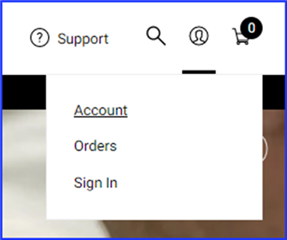
Go to https://www.garmin.com
Click on "Account"

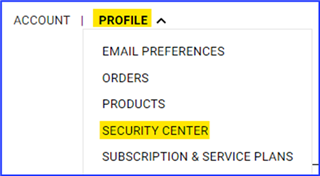
Select Profile >> Security Center

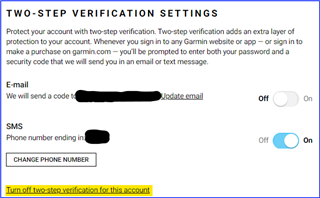
Click on "Turn off two-step verification for this account"

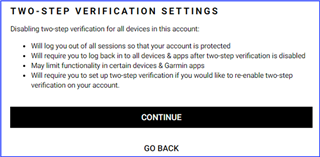
Click Continue

You will be prompted to enter the two-step verification code a final time in order to disable this feature. At this point you'll be logged out of your account and will need to log in again anywhere you're logged in (Garmin Express, Garmin Connect Web, Garmin Connect Mobile, etc.).
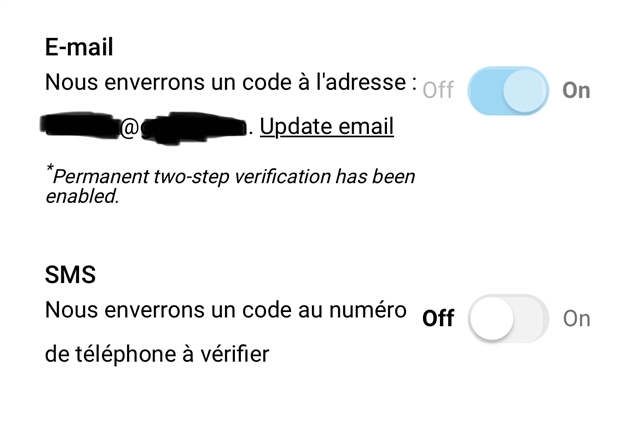
As you can see on my screenshot
I do not see your screenshot.
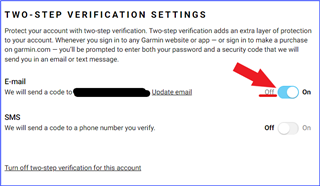
You should be able to just toggle off for the E-mail setting.

You will then be prompted to enter the code you received in an email from Garmin. I enabled mine then disabled it just to make sure this works. It does.
Something with the ECG release has made two step permanent once enabled.
Nope. 955. ECG showed up in my Connect app on Monday and I was stupidly curious.