
This discussion has been locked.
You can no longer post new replies to this discussion. If you have a question you can start a new discussion

No maps for Activities on Connect website?

I have recorded Activities (bike rides) on my Edge 530 with GPS turned on. In the Edge 530, these Activities appear (in History) with a map, but on the Connect website none of the same Activities have maps (strictly speaking, if they do have maps, I cannot see how to display them). Are maps available and if so, does anyone know why I cannot see them in Connect?

I don’t know if it’s relevant, but for each of these Activities, I started off by riding a Course, but then left the Course part way and rode an ad hoc route. I mention this because I note that the Activities each have an existing Course associated with them even though I didn’t completely follow it, and I wonder if that causes a problem.

For further information, I have checked the things Garmin says to check about ensuring the GPS was on.

Top Replies

All Replies

  • Could you make one of the activities public and post a link to it here? Did you check it out also on the Garmin Connect Mobile app? 

  • Sure thing, about making it public. But how do I do that?  I assume it’s from the Activities page but I cannot see a way to change access (sorry!).

    On the app, the Activities do indeed have maps.

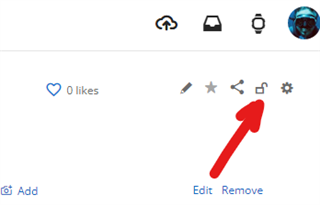
  • A Google search gave me these instructions for changing the privacy of an Activity but there is no padlock on the screen when I do this.

    Garmin Connect Web Instructions
    1. Sign into Garmin Connect from a web browser.
    2. Select Activities.
    3. Select All Activities.
    4. Select the activity you'd like to edit.
    5. Select the padlock from the row of icons in the upper right corner.
    6. Select the desired privacy level for that activity.
    7. It will save automatically.
    I am using Safari on an iPad.  Does the website work differently on a PC?
  • At the risk of simply talking to myself (!) I have found that the Activities on the Connect website do have maps, but you seem to be able to see them only when you compare two (or more) Activities.  Why can’t you see the map for just one activity?

    Also, I logged on to a PC and used the Edge browser to access Connect web, in case it is different to Safari.  It too does not show up a padlock for changing the privacy of an activity.  I guess they must have changed the way the website works.

  • You just need to open the concerned activity in Garmin Connect Web, click the padlock icon top right, and select "Public". No need to set all your activities public. Just one sample.

  •  It too does not show up a padlock for changing the privacy of an activity

    If it does not show the padlock on the web, make it public with the app

  • Thanks for your efforts to solve this “problem”.  By going through what you suggested above, I discovered that I wasn’t looking at the activity’s details page.  Instead, I had been clicking on the activity box (which merely highlighted the activity summary) aand I did not click specifically on the activity’s title.  By doing so, the map, details, padlock etc appear.

    User error or poor UX?  I will call it a draw.  Thanks again.