This discussion has been locked.
You can no longer post new replies to this discussion. If you have a question you can start a new discussion

Moving Time on Connect Web is always less than Time and Elapsed Time

Hi, 

first of all, this is not a new problem and not a major bug for me.

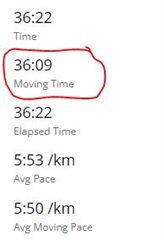
But, I have noticed that Moving Time always is less than Time and Elapsed Time in the Activity Stats. There must be some kind of problems when the Stats are calculated.

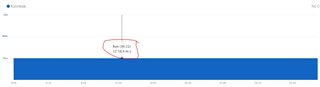
For example these screenshots from todays 6k slow run. I ran all the time which the Run/Walk graphs shows. Moving Time is 13 seconds off. My device is a Fenix 6X Pro Solar with SW 21.71 ALPHA but this problem have existed for a long time so I don't think that its related to the device.
  • You would have to post a link to the activity, so that we can look at the data. It is normal that the Moving Time is lower than the Elapsed Time. It would be concerning if it was in the opposite way. There are several possibilities for the shorter moving time - delay between starting the activity and the watch detecting the running pace (may depend also on the activity auto-stop settings), delay between the end of the run and the time you stopped it, too low pace during the run at some sections, or a dropped out GSP signal (for example in underpasses, under dense vegetation, near high-rise buildings, etc).

  • Often it's less, but not always, I checked one fast run and all times are exactly the same 1:32:58.

    Pace graph for that activity is quite constant, without any drops to bottom, it shows bottom only at the start as one thin line.

    Other activities which times are not even, have some drops on the pace graph, so best to check that graph.

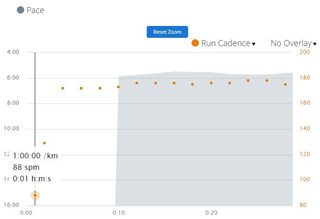
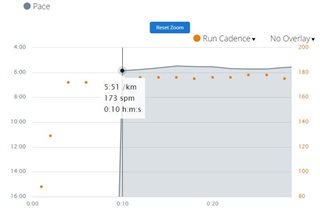
  • Thanks for the answer! I have looked at the data related to your comments and there seems to be a 10 second delay before the Pace (enhanced_speed in m/s) is picked up in the .FIT file so that can explain some of the missing seconds in Moving Time. I'm not using any Auto Pause settings in the device.

    Cadence seems to be picked up after only 1 second. Maybe you can use the Cadence data to improve the Moving Time?

    See screenshots from Connect Web graphs. 

    But, as I wrote earlier, this is not a big issue for me so if its hard to improve you might just skip it. 

  • Maybe you can use the Cadence data to improve the Moving Time?

    You do not speak to Garmin here. This is a user forum, Garmin does not intervene much here. If you want to suggest them a change, use rather the form at Submitting an Idea to Garmin. However, the cadence can be elevated even if you are just skipping on one spot, for example when warming up on place, before starting to run, so I do not think it would be a very good idea.

  • Ahh, I see. I thought you were Garmin staff. Sorry for that.

    Also Distance in the .FIT file is reporting earlier than Pace/Speed. Maybe that would be better than Cadence then.

  • Check out the auto-pause setting in the activity. If enabled, it then starts or un-pauses the activity, only after certain threshold of pace is reached.

  • Auto Pause is off in my device so that shouldn't have any impact on this.