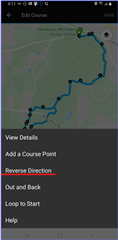
1,5 year ago i reversed a course in the Garmin Connect app. Now the option is gone? Incan't find it anymore
Somebody knows how to do this?
Thanks
Assuming you mean in Garmin Connect Web (this forum)
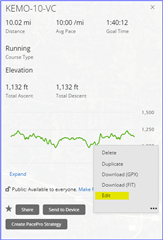
Open the course you want to reverse
Select the 3 dots then edit
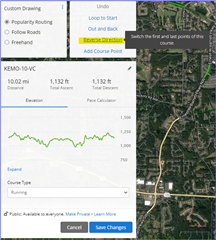
Select Reverse Direction, then Save Changes
If you're referring to the Garmin Connect…
As I mentioned, it doesn't work on the web or in the app if the course was originally synced from Strava. Even if I make a copy of the course in Garmin Connect, the resulting course still can't be reversed…
Assuming you mean in Garmin Connect Web (this forum)
Open the course you want to reverse
Select the 3 dots then edit

Select Reverse Direction, then Save Changes

If you're referring to the Garmin Connect Mobile app, just slightly different

However this doesn't work for a course that was imported from Strava. Even if I later make a copy of the course in Garmin Connect the option to reverse it is simply not there.
As I mentioned, it doesn't work on the web or in the app if the course was originally synced from Strava. Even if I make a copy of the course in Garmin Connect, the resulting course still can't be reversed. Is there a good reason for that?
Basically, I had a course synced from Strava. On the day of the run, shortly before leaving home for for the trailhead, I tried to reverse it in GC and that wasn't possible. Then I had to reverse that on the watch, but that works horribly and the result is unusable either. Yeah, I could probably go back to Strava and reverse there, but I didn't figure that out and I don't see a reason for the GC functionality to be that inconsistent, especially after making the copy of the course.