Is there a way to reset what Garmin says is a fast or slow part of a run? I know I'm a slow runner but Garmin says the whole run is slow or slower.

Is there a way to reset what Garmin says is a fast or slow part of a run? I know I'm a slow runner but Garmin says the whole run is slow or slower.

It's from max to min speed of that one activity, so even a walk can be mostly red.
Check what max you have, if it's too fast, then most likely at some part speed is wrong, it may be at the beginning…
As BunBun! already has explained:
The colors are not assigned to an absolute speed, but are different for each activity. They are relatively dependent on the ratio of the fastest and slowest speed of the…
It's from max to min speed of that one activity, so even a walk can be mostly red.
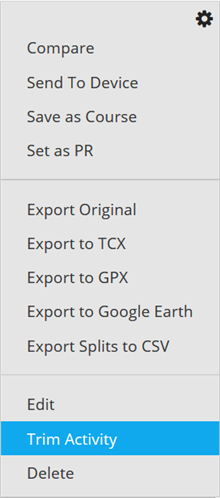
Check what max you have, if it's too fast, then most likely at some part speed is wrong, it may be at the beginning, so try to trim this activity just a bit, one segment, from the start.
Please see the FAQ below from our Support Center:
As BunBun! already has explained:
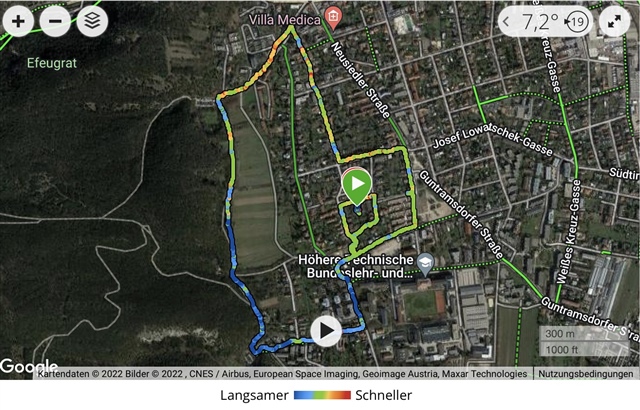
The colors are not assigned to an absolute speed, but are different for each activity. They are relatively dependent on the ratio of the fastest and slowest speed of the recording.
Here is a picture of a leisure walk recording.

If you zip your activity file and upload it here we can have a look if there is a very short but very fast part of your walk/run.
So I guess living on a steep hill means this will never really work around here. At least not for that loop.
It should be fine on a steep hill, unless it's very short and you run down from it like a madman.
Normally a whole blue path indicate that GPS position was wrong at some point, making max speed too high.
As mentioned, you can share this activity so others check it - or try to trim it on your own using this option, there is a good chance that enormous speed is at the beginning:
![]()