This discussion has been locked.
You can no longer post new replies to this discussion. If you have a question you can start a new discussion

Sleep Missing

I've never had good luck with Garmin's sleep tracking. What I would do every morning is adjust my sleep results in Connect web or GMC to something more representative of what actually happened.

This morning, sleep didn't sync at all. I guess my watch decided IA didn't sleep last night. Since there is no record to adjust, I can't add sleep details at all. If there is a way to add sleep data, it is well hidden. I realize Garmin doesn't support naps but this wasn't a nap.

Does anyone know how to add missing sleep when there is nothing to start with?

  • Does anyone know how to add missing sleep when there is nothing to start with?

    The only idea that comes on my mind, is exporting the daily monitoring data from another day, changing the date in it, and then importing to Garmin Connect Web. Not sure whether it works (never tried it with the monitoring data files), but you can try modifying the date with the Fit File Tools (with the Time Adjuster). If not, then Fit File Repair Tools program might work.

    The sleeping data is in the file xxxxxxxxxxxxx_SLEEP_DATA.fit. The xxxxxxxxxxx is a serial number - I am not sure whether you can re-import it for a different day without changing the number, but you can try.

    Exporting of the daily data is available on the Daily Summary page for given day:

    Importing then on the import page.

  • BTW, is the editing of the sleep data disabled in the GC Mobile app too? I cannot test it, since I have no such day without sleep data, and the Edit option is hence always available.

  • GCM doesn't have sleep in the "add data" function.

    This time, I managed to get around it.

    At first, Connect said there was no sleep for last night. However, after a bit of time, it adjusted my sleep to 1 minute (No typo there). Once the record was there, I was able to modify the start and end times. When I first maintained the record, it said I slept 1:05 last night. Now, it says I slept 2:39. In reality, I slept almost 7 hours.

    Garmin's sleep tracking really doesn't work for me. What I do is overcome it's limitations by wearing an Amazfit Band 5 on my other wrist. The Amazfit tends to get the start time right but only says I stopped sleeping when I actually get out of bed. If I lie there for 5 or 10 minutes before rising, it will include it as light sleep. This $27 band does a much better job.

    On another note, good to see you again trux. You were missing in action (to me) for a while.

  • Thanks for the welcome back, pshare! Appreciated.

    GCM doesn't have sleep in the "add data" function.

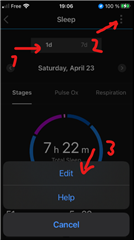
    I did not mean the "add data". I meant going to the daily sleep details screen (you can access them by tapping the sleep in the overview of the last day, or even the last week (switching then to the 1d mode), scrolling to the concerned day, and trying the Edit function there. I cannot test it, because I have sleep data everywhere - it never failed on me, and I really cannot complain about the accuracy either (using Instinct 2 now, previously Instinct, and it was accurate too).